Salesforce Data Import & Reconciliation
The Equipment Request app works when someone fills in the form. Now IT hands you the spreadsheet they have been using while you built it. The requests already have owners, some decisions have already been made, and the dates are in the past.
You could type them in. But typing five records teaches you very little about what to do when the next file contains five thousand, or when an import finishes with some rows accepted and others refused.
Reconciliation means accounting for what happened to every source record, then checking that the resulting data still means what the business intended. A successful save is one piece of that evidence. It does not tell you whether the request belongs to the right person, whether the amount survived the mapping, or whether an old approval has started again.
In this chapter, you will load a small fictional backlog, repair a deliberate failure, prove that a repeated match updates the same record, and recover a changed value.
Where you are: the object is Deployed, its ten fields and both validation rules are active, the approval and fulfilment automation runs, and the evidence run left you four users holding roles and permission sets, two reports in a shared folder, and the Equipment Request — Bypass Rules permission set assigned to nobody. Keep using that same practice org. This chapter loads data into the app you tested, not a clean copy of it.
Budget the install as well as the work. Data Loader is a desktop application you have to download, install, and authenticate before any of this starts, and the loads themselves come in five separate runs with their own output folders. Set aside a sitting, and do the install first rather than discovering the OAuth prompt with a half-prepared CSV open beside you.
🧭 Decide what this import means
Section titled “🧭 Decide what this import means”A spreadsheet rarely tells you which of its columns should become Salesforce fields. First settle what work you are transferring, which values you are expected to preserve, and who is allowed to decide when the source and Salesforce disagree.
Here is the exercise. While you were building the Equipment Request app, IT continued managing a small backlog in a spreadsheet. Five requests now need to move into Salesforce without changing who owns them, the decisions already made, or the cost IT expects to fulfil. The file is deliberately small enough to inspect every outcome; the method is meant to survive a much larger load.
Four requests have already been approved by their managers and remain unfulfilled: two are Approved and two are Awaiting Stock. The fifth was Rejected. For this practice handover, treat IT’s status and estimated cost as authoritative, and make the requester the Salesforce record owner just as the app design requires. One rejected row deliberately lacks its required reason, giving you a controlled failure to diagnose, correct, and retry without switching off the rule that caught it.
The goal is not merely to finish with five successful records. By the end, you should be able to account for every source row, show that each request belongs to the right person, reconcile the unfulfilled cost to 1720.00, prove that a repeated source key updates the same Salesforce record, and restore a value after a deliberate change. The people, requests, and decisions are fictional; a real migration needs the process owner’s agreement and the original evidence behind each decision.
Record that agreement in a short load record: target org, operator, source filename, business owner, operation, matching field, expected counts, expected cost total, and recovery decision. Give this run a name, such as equipment-backlog-01, and keep its files together.
Three details of the app change the migration:
| Existing design | Consequence for this load |
|---|---|
| Owner is the requester; the owner’s role supplies the reporting team | Mapping every row to the administrator would change both access and team totals |
Creating a request with Status Awaiting Approval starts the approval process |
Explicitly map the agreed historical status; a missing mapping could use the default and start new work |
Age formulas start at CreatedDate |
A newly imported record will not show how long it waited in the spreadsheet |
This exercise transfers current state. It does not recreate approval work items, the original submission date, or a historical audit trail. Keep the source evidence, and label the imported records’ ageing limitation in the report description and load record. If accurate historical ageing is a release requirement, add and populate an agreed source-submission field and revise the formulas and tests before accepting that report. Do not change system audit fields as an improvised shortcut.
Leave fulfilled history out of this first load. In your app, a Fulfilled request with no Fulfilled Date gets today’s date from Flow. Importing a historical completion that way would manufacture a completion date. A later history migration must supply and verify the real dates and settle the ageing calculation first.
🔑 Give each request an external ID to match on
Section titled “🔑 Give each request an external ID to match on”You need a way to say “this is the same request again” after Salesforce has assigned its own record ID.
Insert creates a record. Update changes an existing record. Upsert matches a key, updates a record when it finds a match, and inserts one when it does not. That last behaviour is useful for a backlog you may need to retry, but it also means a mistyped key can create an unwanted record. Salesforce documents the matching behaviour in its Data Loader import procedure.
For this load, use a source reference such as LEGACY-ER-001. Keep it unchanged when a row is corrected. A row number is unsuitable: sorting the spreadsheet must not give every request a new identity.
In Object Manager → Equipment Request → Fields & Relationships → New, create a Text field:
| Setting | Value |
|---|---|
| Label | Legacy Request ID |
| API name | Legacy_Request_ID__c |
| Length | 50 |
| External ID | Selected |
| Unique | Selected; treat uppercase and lowercase as duplicate values |
| Required | Cleared; requests created directly in Salesforce have no legacy ID |
| Description | Stable source request reference for migration matching and reconciliation. Preserve when correcting or retrying a load. |
External ID makes the field available for external matching. Unique prevents two records from saving the same nonblank value. They are separate field settings, so select both. Still reject blank or repeated keys in the source file before uploading; a uniqueness setting is not a source-cleaning process.
Grant the load operator edit access to this field. Give IT and Finance read access for reconciliation, and add it to the record page’s System Information section and the reconciliation report. Other app users do not need to edit it. Update the decision record to explain this eleventh field.
If some source requests already exist in Salesforce, match and populate their legacy IDs before the first upsert. An empty legacy field gives the loader nothing to match, even if a human recognises the request’s description. For the exercise, confirm that none of LEGACY-ER-001 through LEGACY-ER-005 exists yet.
🧰 Choose Data Loader or the Data Import Wizard
Section titled “🧰 Choose Data Loader or the Data Import Wizard”For a small supported object, the Data Import Wizard is a reasonable first choice. It works in the browser, supports custom objects, and handles up to 50,000 records per import. Its custom-object matching options include Salesforce IDs and unique external IDs.
| Data Import Wizard | Data Loader | |
|---|---|---|
| Runs in | The browser, inside Setup | A desktop application you install |
| Record ceiling | 50,000 per import | Far higher; suits repeated runs |
| Operations | Insert, update, upsert | Insert, update, upsert, delete, export |
| Result files | Emailed summary | Success and error CSVs you keep |
| Choose it when | A one-off load you can watch finish | You need exports and retained evidence |
Here, use the desktop Salesforce Data Loader because the same exercise needs exports, explicit upserts, and saved success and error files. Its download page links the current release. This is the desktop application, separate from the browser-based dataloader.io, which runs on MuleSoft’s Anypoint Platform.
Data Loader’s documented editions include Developer Edition. The operator needs application programming interface (API) access and access appropriate to the operation, including the mapped fields and target records. For this isolated exercise, use your practice-org administrator and verify the org identity before loading. In an organisation, agree an operator with scoped access rather than copying the administrator profile onto a migration user.
Authenticate through the current client’s supported OAuth sign-in and the org’s approved app policy. If you receive “Your administrator has blocked access to this client”, resolve the app access configuration with the org owner before proceeding.
For repeatable practice results, select Use SOAP API in Data Loader Settings, with Bulk API and Bulk API 2.0 disabled. Leave Insert Null Values off and set the Data Loader time zone to GMT for the date-only sample. Save a note of these settings. This is a small learning run; API and batch-size choices for larger loads deserve their own test.
🔍 Find out what the load will trigger
Section titled “🔍 Find out what the load will trigger”Leaving the automation active is the right choice here, but it is not the same as knowing what it will do. Before any load, work out what runs on insert and update for the object, and what each one does when it runs: the emails and notifications that reach people, and the field updates, assignments, and outbound calls that reach other records and other systems. Start with the object’s flows and its approval process, and do not assume an inherited org holds only those — automation that is no longer supported still executes. Then decide each one deliberately: on for the load, or off with a note saying why and when it goes back.
In this practice org the answer is comfortable. The automation touches fictional users, the approval only fires on records created with Status Awaiting Approval, and the imported rows arrive already decided, which is what the pilot’s history check confirms. Recording the answer still matters, because the next org you do this in will have real people in it.
In production this gets expensive. A historical load can notify people about decisions taken months ago, assign work that was completed long before you arrived, or greet a customer with an update about something they have forgotten. A practice org cannot rehearse that for you, and neither can a sandbox with deliverability set to system email only. Ask what will run, what it will send, and to whom, while the answer still costs nothing.
📁 Prepare a CSV you can explain
Section titled “📁 Prepare a CSV you can explain”Keep the original source untouched. Make a working copy for approved corrections, a separate file for each upload, and a ledger tying each legacy ID to its outcome. Success and error files can contain the business data you uploaded, so store them with the same care as the source.
Start with these five fictional requests. Staff A and Staff B mean two active practice users in different reporting roles, whatever those users are actually called in your org; the screenshots below show mine. Staff A’s manager should not have access to Staff B’s records through the hierarchy.
| Legacy ID | Owner | Status | Estimated cost |
|---|---|---|---|
LEGACY-ER-001 |
Staff A | Approved | 1200.00 |
LEGACY-ER-002 |
Staff A | Awaiting Stock | 250.00 |
LEGACY-ER-003 |
Staff B | Approved | 90.00 |
LEGACY-ER-004 |
Staff B | Awaiting Stock | 180.00 |
LEGACY-ER-005 |
Staff A | Rejected | 0.00 |
The agreed unfulfilled cost is 1720.00, in one currency: 1450.00 for Staff A’s team and 270.00 for Staff B’s. Use the same currency for every sample record, and check it against the currency and locale baseline you set for the org. If multicurrency is enabled, explicitly prepare and map CurrencyIsoCode to the agreed active currency; reconcile in that currency before comparing converted report totals.
Copy the following into a UTF-8 CSV working file. It is deliberately unfinished: replace STAFF_A_ID and STAFF_B_ID with the corresponding Salesforce User IDs, and EQUIPMENT_API_VALUE with a real API value from your Equipment Type picklist. Use the Status API values from your build if they differ from the labels shown here.
Legacy_Request_ID__c,OwnerId,Equipment_Type__c,Status__c,Business_Justification__c,Needed_By__c,Expected_Delivery_Date__c,Estimated_Cost__c,Rejection_Reason__cLEGACY-ER-001,STAFF_A_ID,EQUIPMENT_API_VALUE,Approved,Replacement for failed equipment,2026-08-10,,1200.00,LEGACY-ER-002,STAFF_A_ID,EQUIPMENT_API_VALUE,Awaiting Stock,Equipment for a new starter,2026-08-12,2026-08-20,250.00,LEGACY-ER-003,STAFF_B_ID,EQUIPMENT_API_VALUE,Approved,Replacement for damaged equipment,2026-08-14,,90.00,LEGACY-ER-004,STAFF_B_ID,EQUIPMENT_API_VALUE,Awaiting Stock,Equipment for a shared workspace,2026-08-17,2026-08-24,180.00,LEGACY-ER-005,STAFF_A_ID,EQUIPMENT_API_VALUE,Rejected,Additional equipment for home use,2026-08-18,,0.00,These dates deliberately describe a backlog. Preserve them rather than changing them to tomorrow to get through validation. The expected-delivery dates can also be overdue; that is operational information IT should see.
The final row has no rejection reason. Leave it blank for the controlled failure test. In a real preparation run, you would hold that row out and ask the source owner to complete it before loading.
👤 Resolve the owners before uploading
Section titled “👤 Resolve the owners before uploading”Names are for humans; OwnerId needs the User record ID. Salesforce’s Data Loader error guidance identifies names or IDs from the wrong object as common ownership failures.
Use Data Loader’s Export operation on User, selecting Id, Name, Username, IsActive, and UserRoleId. Find your two intended users by username, confirm they are active, and confirm each has a UserRoleId. The role is what the grouped cost report reads later, and a blank one is easier to fix now than to diagnose from a report. Copy their 18-character IDs into a small owner cross-reference. Replace every placeholder from that cross-reference. An unresolved owner is a reason to hold the row, not assign it to yourself.
Then inspect the actual saved CSV as text. Check that every row has nine columns, every key is present and distinct, and no spreadsheet conversion has altered an ID, date, or amount. Keep amounts free of currency symbols and thousands separators. Quote any text containing a comma. Salesforce accepts date-only values in YYYY-MM-DD format; verify the saved date on the pilot record as well as the file.
Do not include the auto-number Name, formula fields, or CreatedDate in the upload. Let Salesforce generate its request number, and let the existing formulas calculate from the actual saved record.
📥 Run a Data Loader pilot with one known failure
Section titled “📥 Run a Data Loader pilot with one known failure”A pilot should tell you whether the mapping, rules, and side effects behave as expected. Two happy rows would leave the recovery path untested, so start with LEGACY-ER-001 and LEGACY-ER-005.
I learned this from five apology emails. I was running a data update in production. I had tested it in my sandbox over and over, and I was confident. I ran a five-record pilot first anyway, more out of habit than any real doubt. The records updated exactly as expected. They also fired a notification I had forgotten was attached to that update, and five real customers received an email about a change that meant nothing to them.
My sandbox had never sent one, because I leave deliverability on System email only. New and refreshed sandboxes arrive set that way and I have never had a reason to change it. The setting exists to stop test work reaching real people, and it does that job well. It also means the part of the update I most needed to see was the one part my sandbox could not show me. No amount of repeating the test would have found it.
The pilot cost five apologies. The whole file would have cost the entire backlog. It is also why the pilot below checks for approval work that should not exist, rather than only checking that the record saved.
The error file deserves the same rehearsal. It is not a document, it is a workflow — where it lands, what it actually contains, and how a corrected row gets back in without disturbing the rows that already loaded. The expensive time to learn that workflow is with a real backlog half-loaded and somebody asking how long the fix will take. Ten minutes here buys the answer in advance.
Before loading, export the current Equipment Requests, including Id, Name, Legacy_Request_ID__c, OwnerId, and every stored field in the upload. Retain this baseline even if none of the five keys exists. It separates records that were already there from records the load creates.
Create pilot.csv with the original header and only rows 001 and 005. Keep the other three rows in remaining.csv. Record the planned pilot result: one inserted request and one rejected row.
-
Check the org and the operator. Confirm the practice org, the named user, the temporary bypass assignment, and both active validation rules. Check the approval entry condition is still “created with Status Awaiting Approval”.
-
Choose Upsert in Data Loader. Select
Equipment_Request__candpilot.csv. ChooseLegacy_Request_ID__cas the matching field. For this exercise, related User records are identified directly byOwnerId; no related-object external-ID selection is needed. -
Create or edit the field map. Map each CSV column to its same-named Salesforce field, including the legacy ID itself. Check
OwnerId, Status, Needed By, and Estimated Cost individually. Save the map for the remaining load. -
Choose a separate pilot output folder and run the load. Retain both result files and the completion counts. Salesforce’s output-file guide explains how to inspect successful and failed rows.
-
Inspect the result in Salesforce. Request 001 should have Staff A as owner, Status Approved, cost 1200.00, and Needed By 10 August 2026, which your org displays in its own locale format —
10/08/2026or8/10/2026.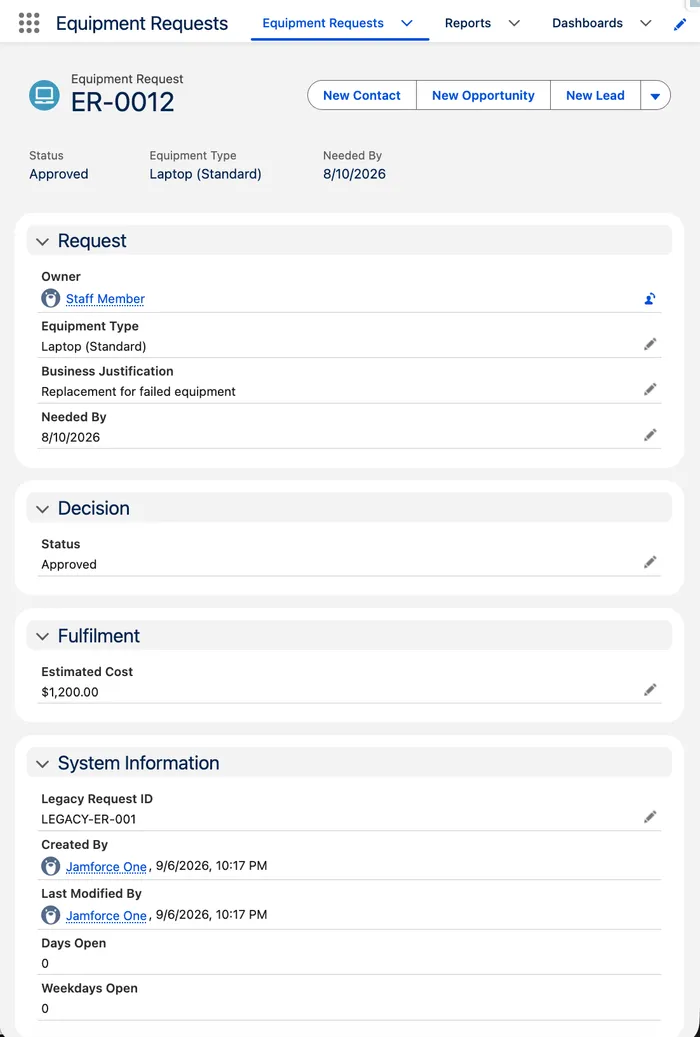
There should be no new approval work for this imported request. The history panel is the check people skip: one entry, Created, means the import inserted the record without starting the approval the app runs for new requests.
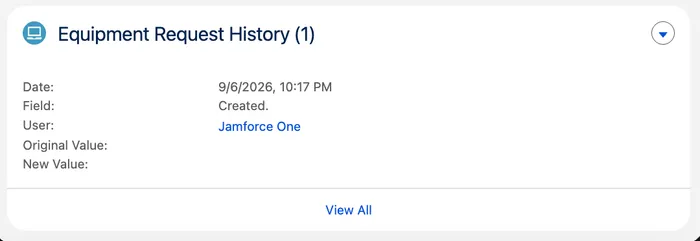
Request 005 should be absent, and the error file should carry the rejection-reason validation message:
FIELD_CUSTOM_VALIDATION_EXCEPTION: Please enter a rejection reason. The requester will see this text, so say what they need to change. [Rejection_Reason__c]
If the pilot differs, stop before loading the remainder. Two successes could mean the rejection rule is inactive. Two failures could mean the operator lacks the bypass, a placeholder survived, or a picklist API value is wrong. An accepted row with the wrong owner is also a failed pilot, even when the error file is empty.
The Trailhead project below runs the same tools on a different data set, with the Data Import Wizard and Data Loader side by side. It is a good place to rehearse the mechanics once more before you repair the failed row here, because the project’s data is disposable and yours is about to become the app’s history.
🔧 Repair the failed row without replaying the backlog
Section titled “🔧 Repair the failed row without replaying the backlog”The rejection error is doing its job. The validation rule you built earlier requires a reason on a rejected request, and the source says a manager rejected request 005 but supplies nothing the requester can act on.
For this fictional exercise, the source owner confirms the reason: Existing equipment meets the requirement. Add that to row 005 in your working copy and ledger. In a real load, retain who supplied the correction; do not invent a reason merely to satisfy the field.
Create retry-005.csv with the same header and only the corrected row. Upsert it using the same matching field and saved map, into a new output folder. Expect one success. Then upsert the three rows in remaining.csv, again retaining their separate results. Expect three successes.
| Symptom | What to inspect | Recovery decision |
|---|---|---|
| Validation error | Exact message, source values, operator’s bypass assignment | Correct the source or apply the agreed exception; do not deactivate all rules |
| Invalid restricted picklist value | Saved API value, whitespace, allowed values | Correct the mapping; a new business category needs a separate configuration decision |
| Owner or access error | User ID, active status, object and record access | Resolve the intended owner and operator access before retrying |
| Duplicate or ambiguous key | Repeated source keys and existing Salesforce matches | Resolve which business request the key identifies before another write |
| Flow error or uncertain job outcome | Error details, saved records by key, and automation state | Establish what committed and what remains unresolved before retrying |
This is why a corrected-row file is useful. It makes the next change inspectable. Replaying the full original file can overwrite a value someone has already corrected in Salesforce, even when the external ID prevents a second record.
📊 Reconcile records, then reconcile meaning
Section titled “📊 Reconcile records, then reconcile meaning”The loader reports write attempts. The business cares about requests. If you add every result row from every retry together, those are different counts.
Keep two levels of evidence:
| Run | Submitted rows | Successful writes | Failed rows |
|---|---|---|---|
| Pilot | 2 | 1 | 1 |
| Corrected 005 | 1 | 1 | 0 |
| Remaining backlog | 3 | 3 | 0 |
There were six attempts to load five distinct requests. Your ledger should now contain five unique legacy IDs, each linked to one Salesforce ID, with no unresolved source rows. For each completed run, submitted rows should equal successes plus failures. If a job is interrupted or leaves rows unprocessed, record those as unresolved; do not force the arithmetic to balance by labelling them successful.
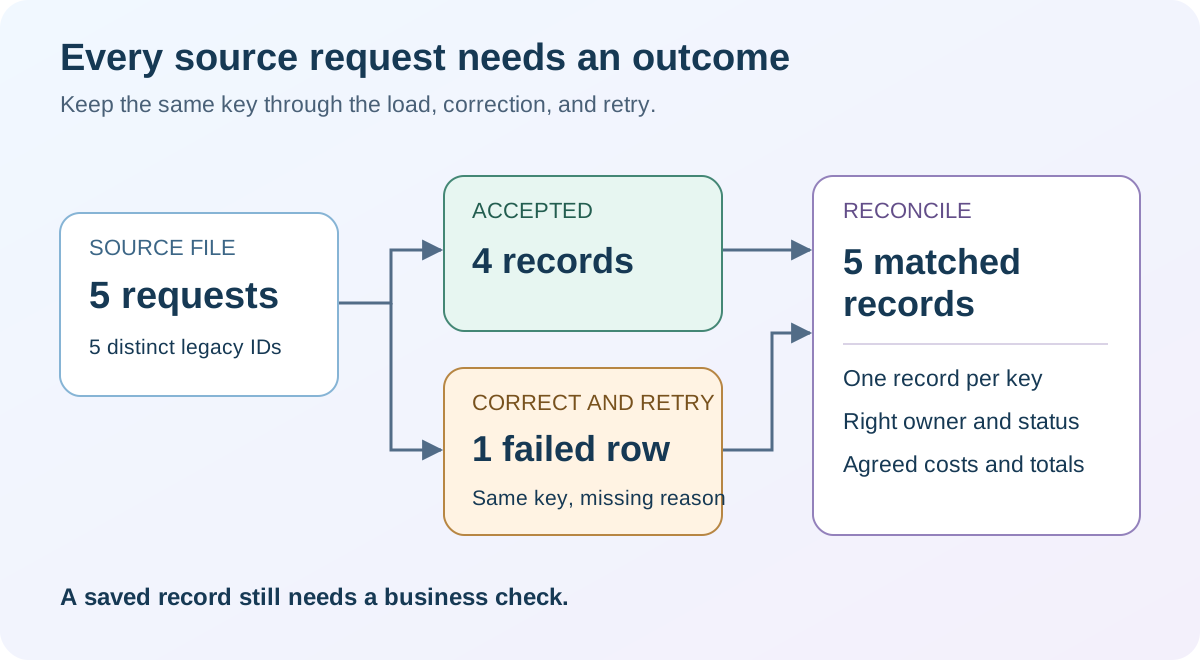
Export Equipment Requests again with the same fields as the baseline. Match the five source keys to the export. Confirm each appears exactly once and compare every sample row’s owner, status, dates, cost, and justification. Counts alone cannot detect a swapped owner or a misplaced decimal point.
The word I have learned to be careful with is reconciled. It carries two different claims: that the numbers agree, and that the records mean what the source meant. The first is arithmetic, and a spreadsheet will do it for you. The second needs somebody to look at a row and say yes, that is the request Ops raised in August, owned by the person who raised it, at the cost that was approved. A load can pass the first test on every row and fail the second on every row, and the totals look identical either way. When I say a load is reconciled I mean the second one, and I try to say which I mean, because the person reading the number later will assume I meant both.
Create a reconciliation report containing all five legacy IDs, with All Equipment Requests and an unrestricted relevant date filter. The earlier operational reports deliberately exclude some statuses, so they cannot establish that every source request arrived.
Now return to Approved, Unfulfilled Cost from Test Permissions & Reports. Save a copy filtered to these five legacy IDs so existing practice data cannot affect the total. The four Approved or Awaiting Stock records should total 1720.00, with team totals 1450.00 and 270.00. The rejected row belongs in reconciliation but contributes nothing to this operational report.
If the grand total is right but no team totals appear, the grouping is reading an empty field rather than the wrong one. A report groups by Role Name as displayed on reports, which is set on the role in Setup and is separate from the role’s Label — a role can show Ops Team on the user record and nothing on the report. Two owners with that field blank also collapse into the same group, so correct rows, correct owners, and a correct total can still produce a single heading of -.
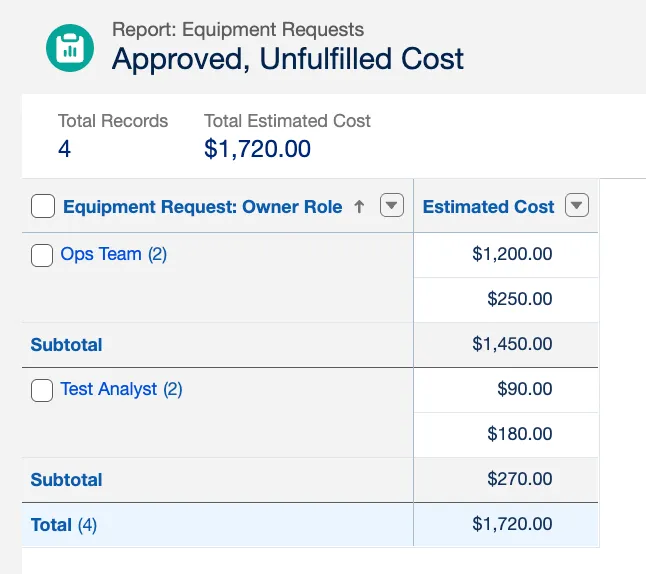
Repeat the checks as people who use the app. Staff A should find their three imported requests in My Requests and be refused access to Staff B’s two. Their manager should see the intended team’s requests, IT should see both teams, and Finance should see the cost report with read-only access. A report that balances only for the administrator has not passed the access test.
Reconciliation is the habit the Data Quality and Validation superbadge tests, on an org you have not prepared. Take it after this chapter if you want an independent check that you can spot and fix bad data without the ledger you built here.
🔄 Prove the upsert matches, then rehearse recovery
Section titled “🔄 Prove the upsert matches, then rehearse recovery”A repeatable load must survive a correction. Before closing, prove the key identifies an existing record and that you can recover the value you changed.
Remove the operator’s bypass assignment first and record the removal. The loads are finished, so the exception has no remaining job, and these steps change no dates. Leave it in place and step 3 proves nothing: a mis-scoped rule would be suppressed rather than exposed, and the save would succeed either way.
-
Retain the current values for request 001. Keep its Salesforce ID, legacy ID, and cost 1200.00 from the post-load export. This is the before-change evidence for the recovery test.
-
Create a two-column correction file. Use only
Legacy_Request_ID__candEstimated_Cost__c, with one row containingLEGACY-ER-001and1250.00. Upsert by the legacy ID, mapping only those two fields. Choose a new output folder. -
Verify the match. The Salesforce ID must be unchanged, the five-key record count must remain five, and the cost report should increase to 1770.00. The old Needed By date should not block this cost-only update because the rule is scoped to creation or a changed Needed By value.
-
Restore the original cost with Update. Make a recovery file containing only
IdandEstimated_Cost__c, using the saved Salesforce ID and1200.00. Map those two fields and run Update. Verify the same record and the restored report total of 1720.00, retaining this run’s results too.
Field history keeps both halves of that rehearsal. The restore does not cancel the change, it follows it, so the record now carries its creation, the move to 1250.00, and the return to 1200.00. Recovery that leaves a trail is what lets someone else confirm afterwards what you did and when.
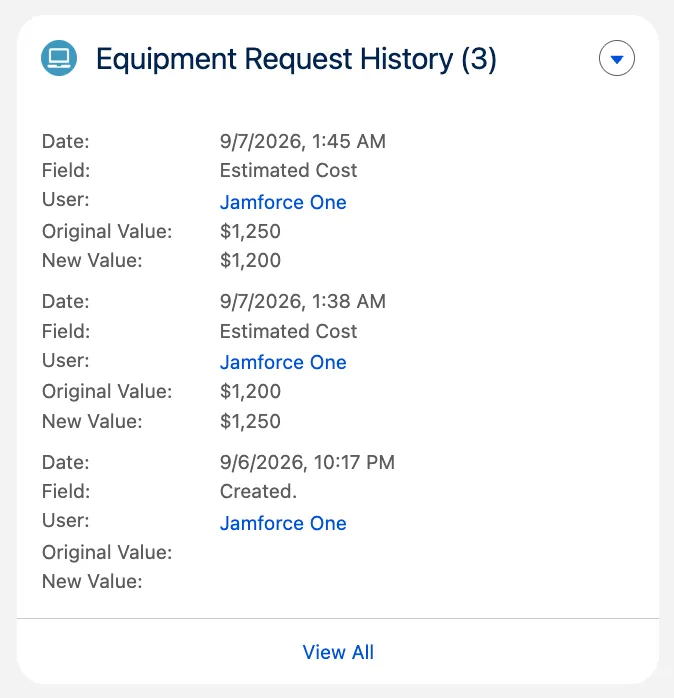
Using Update for recovery expresses the decision that an existing record must be changed. It avoids treating a missing match as permission to create another request. Limiting the columns also avoids replaying stale ownership or status values from the earlier file.
This correction does not need to clear a field. When recovery does require a blank, test the exact API and null settings first. Data Loader normally treats an empty CSV cell as no change; Insert Null Values changes that behaviour, and Bulk API has additional considerations. An absent column, a blank cell, and an instruction to clear a value are different decisions.
A recovery plan for a bad initial insert is different again. It may identify only the newly inserted Salesforce IDs for reviewed deletion, but must first check subsequent edits, relationships, and automation effects. An upsert can mix inserted and updated records, so deleting every ID in a success file would be unsafe. Nor does deleting a request retract a notification or reverse another system’s work. The Data Management chapter covers the wider backup and recovery responsibility.
For a production load, agree whether failure means correcting forward, restoring selected fields, or removing confirmed new records, and rehearse that choice. A successful export is evidence of what you had; the recovery test is evidence of what you can restore.
✅ Checkpoint
Section titled “✅ Checkpoint”Produce an account of the load that another administrator can follow without rerunning it.
Reconcile it, then write down:
- The preserved source and every prepared file, with the field map, operator, org identity, and settings that produced them.
- Five stable legacy keys, the owner cross-reference behind them, and the agreed status and currency decisions.
- Separate success and error results for each run: pilot, corrected row, remaining load, matching test, and recovery.
- A ledger of five source requests against five Salesforce IDs, with no unresolved rows.
- Report evidence for 1720.00, including both team totals and the checks run as the people who use the app.
- The same Salesforce ID before and after the cost correction, and the field history showing 1200.00 restored.
- Two named limitations, historical ageing and absent approval history, alongside the earlier holiday-calendar gap.
Confirm the bypass assignment is gone and its removal recorded. Then, as the operator, create a practice request dated yesterday; it should be refused exactly as it was before the load.
You’re finished when you can answer this without reopening the output files: a report total looks wrong a month from now. How do I tell whether this import caused it? The answer is the legacy key on every record and the runs retained beside it, which together say what arrived, when, and on whose decision. Without them you have not imported data, you have introduced it.
🎯 Final Thoughts
Section titled “🎯 Final Thoughts”The rejected row was the cheap failure. Data Loader refused it, named the rule, named the field, and wrote it to a file you could open. Understanding it took seconds and fixing it took one value. Nothing in this chapter needed a method to catch that row, because it announced itself.
The expensive failures are the ones that succeed. A request loads cleanly into the wrong owner and looks entirely correct on screen. A cost lands in a second currency and produces a total that is merely different, not visibly wrong. A report can balance to the agreed figure while grouping every row under a heading that means nothing. That asymmetry is what the pilot, the ledger, the reconciliation, and the checks run as other people are all for: the errors take care of themselves, and the accepted rows are the ones nobody is interrogating.
The piece I would not give up is the legacy key, and not because the upsert needs it — matching would work perfectly well from exported Salesforce IDs. The key earns its place later, once the output folders are archived and nobody remembers which run produced what. It is the only part of this exercise that stays on the record. It is what lets somebody ask where a number came from long after you have stopped thinking about the spreadsheet, and get an answer rather than a shrug.
Some of the past can be carried across and some cannot, and telling the two apart is its own skill. Original timestamps can come with the records, once somebody decides that writing provenance from a spreadsheet is legitimate. Approval history cannot: those were events, and events do not travel in a CSV. What you are left holding is a set of records whose ageing understates them and whose decisions have no trail behind them. That is not a defect to engineer around; it is a sentence in the handover, written where the next person reading one of these reports will find it before they draw a conclusion from it.
You now have five records you can account for, and a written reason for every difference between them and the spreadsheet they came from. That is a better result than five records that merely match.
🚀 Next steps
Section titled “🚀 Next steps”This completes the required Salesforce Admin Essentials sequence.
Six of the seven chapters asked you to write something down, and it is worth seeing the set together before you move on, because separately they look like homework and together they are a handover pack: the one-page brief, the org baseline record, the rules decision record, the written access model, the evidence record, and this chapter’s load record. Between them they answer the questions nobody can get from the metadata. Why this object exists and who agreed to it. Which settings were chosen rather than inherited. Which rules were considered and rejected, and why. What was proved, by whom, from which seat. What arrived in the org that wasn’t typed by a user, and on whose decision. Keep them in one place, wherever your team already keeps things, and the next admin inherits an application instead of an archaeology project.
Then return to the Salesforce Admin Journey for the map, and begin Salesforce Administration with Org Health & Monitoring. The next job is recognising when a working org needs attention, including the data processes you have just introduced to this one.
If recovery is the part you want to take further, Data Management covers the backup, export, and retention responsibilities that this chapter only rehearsed across five rows.
📚 Resources
Section titled “📚 Resources”For another guided introduction to preparing and importing data, work through the Trailhead unit below. Keep your own reconciliation ledger alongside the exercise.