Salesforce Requirements Gathering & Solution Design
Salesforce Fundamentals gave you the vocabulary: objects and fields, users and permissions, record access, reports, and a practice org where mistakes are cheap. That makes it safe to experiment, but it doesn’t tell you what’s worth building. Before you open Setup on anything real, pause for one chapter. Some of the most expensive Salesforce mistakes are beautifully built solutions to the wrong problem: a custom object that should have been a picklist, or an automation that faithfully enforces an approval path nobody actually follows.
Configuration is fast, which is exactly what makes this dangerous. A developer who misunderstands a requirement may spend a sprint building the wrong thing. An admin can make the same mistake before lunch, with users already entering data before anyone has agreed what the new field is for. Catch it that afternoon and the fix may still be small. Leave it in place, and removing it later can mean cleaning up records, changing reports and automation, and asking people to unlearn a process they were told to follow.
This chapter is about the work that happens before Setup: understanding what someone actually needs, mapping how the work really flows, and writing it down in a form you can build from and test against. Salesforce requirements gathering sounds like a formal discipline that belongs to someone else, and on a large programme it often does. On an admin team it is usually just you, working out what a colleague actually meant. By the end you’ll have a one-page brief for the Equipment Request scenario.
🔍 The request is not the requirement
Section titled “🔍 The request is not the requirement”People rarely ask for what they need. They ask for the solution they’ve already imagined, and that solution is shaped by whatever they last saw working somewhere else.
This shows up in Salesforce in a handful of recognisable ways:
- “Can you add a field?” Sometimes a new field is the right answer. Often, the real goal is a report, and the data it needs is already stored in another field.
- “We need a new object for this.” Maybe. First ask what makes these records different from the ones you already have: their purpose, lifecycle, ownership, or access rules. If the answer is “nothing”, the work may belong on an existing object.
- “Can you automate this?” Automating a broken process makes it break faster and more consistently. Find out why it’s failing first, then automate the process you actually want people to follow.
- “Make it like the old system.” Reasonable-sounding, and the fastest route to a Salesforce org that fights the platform at every turn.
None of these are people being difficult. They’re being helpful, offering you a solution because they assume the mechanics are your job and the thinking is theirs. Your job is to get underneath it to the problem, without making anyone feel interrogated.
Three questions do most of the work:
- What will you do with it once you have it? Turns a feature request back into an outcome.
- How do you handle this today? Reveals the real process, including the spreadsheet nobody mentioned.
- What goes wrong at the moment? Separates a genuine problem from a mild preference, and tells you what “better” would look like.
Then close the loop before you leave the conversation. Say back what you heard, in your own words rather than theirs: what happens now, who does what, and where it goes wrong today. Being slightly wrong is the useful part. People correct a wrong summary immediately and without any awkwardness, where the same person will nod along to a question they only half understood.
🤝 Discovery questions that change the design
Section titled “🤝 Discovery questions that change the design”Discovery is the work of understanding the problem before you design the solution, and it is a core part of a Salesforce business analyst’s work. “Understand the need” is good advice, but it doesn’t tell you what to ask next.
In Salesforce, one answer can change the fields you create, who can see the records, the automation you build, or whether the work needs another team. The questions below turn discovery into admin decisions you can act on.
| Ask | The admin decisions it shapes |
|---|---|
| Who does each step, and what do they need to do? | Permission sets, record ownership, and which users you need to test as |
| Who needs to see these records, and who must not? | The organization-wide default (your record-access baseline) and which users need more access |
| What will people need to filter, group, or measure later? | The fields and data types you need so reports can filter, group, and summarise the data |
| What happens when something goes wrong or someone changes their mind? | Status values, validation rules, and how a user or Flow gets the process back on track |
| How often does this happen, and how many records are involved? | Whether a Flow must handle records in bulk, how much test data you need, and how quickly storage will grow |
| Does anything outside Salesforce need to know about this? | Whether email or an in-app notification is enough, or the solution needs an integration and help from another team |
| How long must these records be kept? | Retention rules, and whether you archive, export, or delete old records as storage grows |
| Where will people do this work? | Page layouts, required fields, and whether the experience works on a phone |
Some answers become non-functional requirements: constraints on how the solution must behave, rather than a feature someone uses. Who must not see a record, how quickly an automation must respond, and how long the data must be kept are requirements too. They may not become fields or Flows, but they still shape the design.
Don’t march through the table like a questionnaire. Start with the questions most likely to change this piece of work, then follow the answers. Most are about people, rules, and real working conditions rather than Salesforce features. That’s deliberate: what you configure in Salesforce should follow the requirement, not lead it.
One question is worth asking early: who must not see these records? The answer helps you set the organization-wide default, which determines the starting level of record access. Roles and sharing rules can then give additional access to the people who need it. If you discover the boundary after launch, you can tighten future access, but you cannot undo what people may already have seen. Record Access explains how Salesforce resolves access; your job here is to find the boundary before real data is loaded.
🧭 Map the process before you model the data
Section titled “🧭 Map the process before you model the data”Not every change needs a process map. If the request really is a field to capture a value the business already understands, confirm who will use it, why it’s needed, and how it will be reported on, then make the change safely.
Map the process when the request changes how work moves between people or what should happen next. Work at the level of steps and decisions. A data model shows what you need to store; a process map shows what should happen when a manager is away or a request is rejected.
Many requests to “automate the process” arrive before the people involved agree what the process is. Mapping the steps and exceptions first gives you something stable to build, test, and support.
Scenario: Staff need work equipment, mostly laptops and monitors. Today, a staff member emails their manager to request equipment. If the manager approves the request, they forward it to IT. IT then orders the equipment. Nobody can answer “where is my laptop?” without searching three inboxes, and finance can’t see committed spend until the invoices arrive.
We return to this worked example in several later chapters, using it to connect requirements, data modelling, and configuration.
Start with the happy path, in plain language, with no Salesforce in it:
-
A staff member asks for a piece of equipment, says why they need it, and says when they need it by.
-
Their manager decides whether the team needs it and can justify the cost.
-
IT checks whether it’s in stock or needs ordering, and confirms the spec.
-
IT fulfils the request and records what was actually issued.
-
The requester is told it’s ready, and where to collect it.
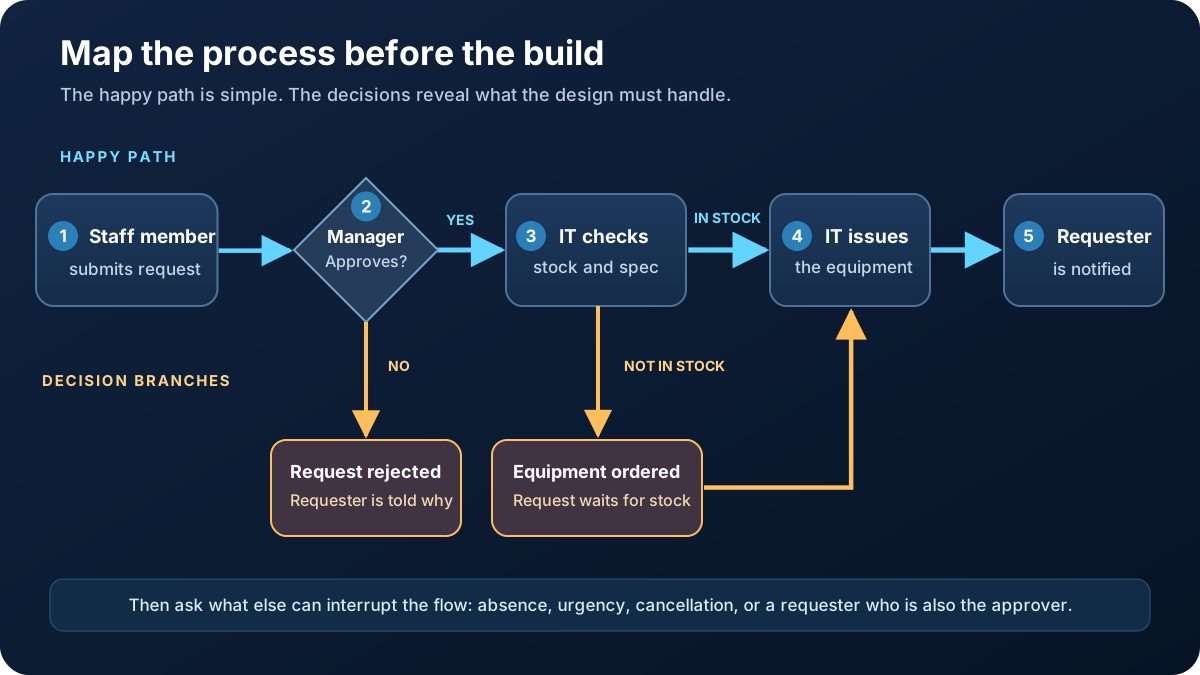
The happy path still has five steps, but the diagram makes the two decisions visible. A manager can reject the request, and IT can find that the equipment is not in stock. Those branches are where the process needs more detail.
Now look beyond the happy path for the exceptions, which is where most of your real design work lives:
- The manager is on leave. Does it wait, or does it escalate?
- The manager rejects it. Does the requester find out why, and can they appeal?
- The item is out of stock. Is that a rejection, or a request in a holding state?
- The requester leaves the company mid-request. Who closes it off?
- Someone urgently needs a replacement for a broken laptop. Is that the same process or a different one?
- The person requesting is the manager. Who approves it?
That last one catches almost everybody, and it costs about ten seconds to ask. Every exception you find now is a design decision you get to make deliberately, rather than a support ticket in three months.
🪞 Play the process back to the people who do it
Section titled “🪞 Play the process back to the people who do it”The map you have just drawn is still your interpretation of what you were told. Playing it back is what turns it into something the business has actually checked.
Do it while the map is still rough, and do it out loud. Walk through it a step at a time, naming who does what, then hand over the pen: “where does that not match what actually happens?” A rough diagram is unusually good at drawing out a correction. People who don’t usually redline a paragraph will happily point at a box and tell you the work goes somewhere else.
Play it back to the people who do the steps, not only the person who asked for the work. A requester, an approver, and whoever handles fulfilment each see a different slice of the same process, and the places where their accounts disagree are the most useful thing you will find that day. Read the exceptions out one by one as well, because “what happens when the manager is away?” is a question people can answer even when they cannot describe their own process in the abstract.
If everyone agrees straight away and nobody raises an exception, be suspicious rather than pleased. It usually means the map is still too vague to disagree with.
📏 Acceptance criteria you can actually test
Section titled “📏 Acceptance criteria you can actually test”Acceptance criteria are the checks you’ll use to decide whether a change is finished and fit for purpose. Agree them with the business owner before you build, so neither of you has to interpret “done” at the end.
The business or product owner is accountable for the outcome, as Salesforce Roles explains, but don’t expect a finished list to land in your inbox. You’ll usually need to draw out the detail, turn vague expectations into testable statements, and take them back to the owner for confirmation.
🧩 Writing Salesforce user stories and acceptance criteria
Section titled “🧩 Writing Salesforce user stories and acceptance criteria”You may have seen requirements written like this:
As a staff member, I want to submit an equipment request so that my manager can review it.
That is a user story: it captures who needs something, what they need, and why. The acceptance criteria sit underneath it and spell out the checks that prove the story is complete. You can write those checks as plain statements, as this chapter does, or in Given / When / Then form. The format is not the test; this is: could someone else check it without asking you what you meant?
| Not testable | Testable |
|---|---|
| The process should be secure | A manager can see requests from their own team, and cannot open a request from another team |
| Managers should be notified | When a request is submitted, its manager receives an email within five minutes containing the requester, item, and a link to the record |
| It should be easy to use | A requester can submit a complete request without help, in under two minutes |
| Reporting should be available | IT can list open requests older than five working days, grouped by team. For this criterion, working days are Monday to Friday in the org’s timezone, excluding dates in the organisation’s agreed holiday calendar |
The left column feels like agreement and isn’t. Everyone nods, and then discovers at go-live that they meant different things. The right column is boring, specific, and testable. Someone can demonstrate each criterion in front of the people who will sign it off.
Two habits make them stronger. Write at least one negative criterion (something the system should prevent) because those are the ones that turn into access design and validation rules. And write down who signs it off, by name. A criterion nobody owns is a criterion nobody will confirm.
🧾 The one-page brief
Section titled “🧾 The one-page brief”Discovery is useful only if it leaves behind something other people can check. The one-page brief turns what you heard into a shared understanding before anyone starts configuring Salesforce. It is not the solution design, so leave out object names, field names, and Flow details for now. It should make four things easy to find: the problem, the agreed process, what success looks like, and who makes the call when something changes.
“One page” is a discipline, not a printing rule. Keep the decisions someone needs to review in one place, and link to supporting notes if the work genuinely needs more detail. If a stakeholder cannot scan the brief and spot a wrong assumption, the important information is too deeply buried.
| Section | What it holds |
|---|---|
| Problem and outcome | What goes wrong today, why it matters, and what should be better when the work is finished |
| Actors | Who is involved, and what each one does |
| Happy path | The main flow, in steps, without Salesforce terms |
| Exceptions | What happens when the happy path doesn’t |
| Access and reporting | Who may see the records, who must not, and what people need to measure |
| Acceptance criteria | How someone else can prove it works, including at least one thing the system must prevent |
| Owner and sign-off | The named person who decides scope and confirms the result |
| Org context | Which org this lives in, where the first build happens, and which licences the actors already hold, taken from the org context record you made in How the Salesforce Platform Works |
| Out of scope | What this version deliberately will not do |
📌 Equipment Request brief, condensed
Section titled “📌 Equipment Request brief, condensed”Here is what the worked example could look like once the remaining questions have been answered:
- Problem and outcome: Requests are split across email inboxes, so staff cannot see progress and IT cannot see its queue. The new process should give each request one visible status from submission to fulfilment.
- Actors: A staff member submits the request, their manager approves or rejects it, IT checks availability and fulfils it, and finance uses the committed-spend report.
- Happy path: Submit request → manager approves → IT checks the specification and stock → IT fulfils the request → requester is notified.
- Exceptions: A manager’s own request goes to their manager. Rejections include a reason. Out-of-stock requests wait for an expected delivery date. Urgent replacements follow the existing IT incident process.
- Access and reporting: Staff can see their own requests, managers can see requests from their team, and IT can see all requests. Finance can report on approved requests that have not yet been fulfilled.
- Acceptance criteria:
- After a staff member submits an equipment request with the item they need, the reason, and the date they need it by, it appears as Awaiting Approval and their manager can open it for a decision.
- A requester can see the current status of every equipment request they submitted.
- A manager can open requests from their own team, but cannot open a request from another team.
- A manager cannot reject a request without entering a reason. When the rejection is saved, the requester receives a notification containing that reason.
- IT can run a report showing every request that has been open for more than five working days, grouped by team. For this criterion, working days are Monday to Friday in the org’s timezone, excluding dates in the organisation’s agreed holiday calendar.
- Finance can run a report showing the total expected cost of approved requests that have not yet been fulfilled, grouped by team.
- Owner and sign-off: The Head of IT owns the process and approves changes to scope. Replace the role with a named person before the brief is agreed.
- Org context: The Enterprise Edition production org, with its ID in the ticket; first build in the Developer sandbox refreshed last month. Staff, managers, and IT hold Salesforce licences; finance holds Salesforce Platform licences, which is worth knowing before anyone designs a report they cannot open.
- Out of scope: Purchasing-system integration, tracking the equipment after it is issued, and the urgent-replacement process.
The out-of-scope line matters. Scope usually grows through reasonable requests, not dramatic ones: “while you’re there, could it also track returns?” Writing down “not in this version” gives the owner a real choice between protecting the current work and expanding it deliberately.
Keep the agreed brief where the work already happens. Your personal notes help you remember; a ticket, wiki page, or shared document that the owner can review gives the team one version to point to. Record the owner’s approval there as well. A brief nobody has agreed to is still only your interpretation of the conversation.
Circulating the brief is not the same as checking that it has been understood. Walk the owner through it before you ask them to agree to it, the way you walked through the process map. An email approval tells you the document arrived. A conversation tells you whether the person approving it is picturing the same thing you are.
🧱 Deciding how to build it
Section titled “🧱 Deciding how to build it”Only now is it worth asking how. The rule that holds up over time: choose the simplest thing that meets the requirement, and know what would make you escalate.
| Approach | Reach for it when | Escalate when |
|---|---|---|
| No build at all | The problem is that nobody agreed who does what, or a tool you already own does this job | People need shared visibility, history, or reporting that nothing you already own can give them |
| Configuration | The need is capturing, showing, and constraining data with objects, fields, layouts, and validation rules | The rules can’t be expressed with fields and formulas |
| Automation (Flow) | Something must happen in response to a change, or a person must be guided through steps | Flow can’t express the logic, the record volumes are too large to process reliably, or the branching has grown unmaintainable |
| AppExchange package | The problem is solved, common, and not your competitive advantage | Nothing reputable fits, or the commercial terms and data access are a poor trade |
| Code | The requirement genuinely can’t be met declaratively, and needs Apex or a Lightning Web Component | You’re here at all: involve a developer, and agree who maintains it before it gets written |
The first row is the one people skip, and it is the one this chapter has been circling since “can you automate this?”. If the real problem is that nobody has agreed who approves what, an object with a status field will not fix it. It will record the disagreement more neatly, on a system you now have to maintain.
Needing the same logic in several places is not on that list. Flow can call a subflow, so reuse is a reason to factor your work properly rather than a reason to reach for code.
Working down that list rather than up is a habit worth building early. Configuration is easier to hand over, survives upgrades better, and can be understood by the next admin without a code review. That doesn’t make code wrong. It makes it a deliberate choice with a maintenance cost attached, rather than a first instinct.
Run the Equipment Request brief down the list and most of it settles early. Capturing requests, showing their status, and stopping incomplete ones is configuration, which Declarative Business Rules turns into specific fields, formulas, and validation rules. Notifying the manager, routing the approval, and holding a request while stock is on order is Flow. Nothing in the agreed scope needs code. The line that would have changed the answer is the one you marked out of scope: connecting to the purchasing system is where you would be involving a developer or another team, which is exactly why it was worth naming rather than quietly assuming.
The honest version of this decision includes who supports it afterwards. A clever solution only you understand is a risk to the org, and that consideration belongs in the brief alongside the technical one.
🚨 When the brief turns out to be wrong
Section titled “🚨 When the brief turns out to be wrong”It will, and that’s not a failure of the process. Discovery gives you the best understanding available at the time, and building often exposes something the discovery conversations didn’t.
The failure mode is what people do next. The instinct is to quietly absorb the change, because it seems small and raising it feels like admitting you got it wrong. That’s how a build drifts away from anything anyone agreed to.
Three situations, and what each needs:
You discover a missing exception while building. Normal. Add it to the brief, decide with the owner whether it’s in scope now or noted for later, and carry on. The record of the decision matters more than which way it goes.
The requester changes their mind about something significant. Take it back to the brief rather than the build. If the change alters the acceptance criteria, it alters the scope, and that’s the owner’s call, not yours.
Two stakeholders want incompatible things. This is the one to escalate rather than solve. Building a compromise nobody asked for is worse than either option. Put both positions in writing, name the decision that’s needed, and give it to whoever owns the process. That is not passing the buck. It’s a business decision wearing a technical costume.
✅ Checkpoint
Section titled “✅ Checkpoint”Write the Equipment Request brief yourself, and start from the request rather than the answer. The condensed version above is what a finished brief looks like; the skill worth practising is getting there from something much thinner. So begin where an admin usually does:
“Can you build us something to track laptop requests? People keep emailing me and I lose track.”
Work forward from that line without scrolling back, and keep the result to one page. Treat every detail you write as an assumption until you can name the stakeholder who would confirm it.
- Write the problem in business terms, not as a feature request. If your first sentence names an object or a field, you have started in the wrong place.
- List every actor and what each one does. The request names one person; the process needs at least three.
- Draft the happy path in steps someone outside your team could follow, with no Salesforce words in it.
- Find at least four exceptions of your own, including who approves a manager’s own request.
- Write four acceptance criteria, at least one of them negative, and hold each to the test from earlier: could someone else check it without asking you what you meant?
- Name a fictional owner for scope decisions, and write an explicit out-of-scope list.
- Note what you would play back, and to whom. For each section, name the person who would correct it and what you expect them to say.
- Sketch the build underneath the brief, not in it. A few lines is enough: what looks like configuration, what looks like Flow, and what falls outside because it would need code or another team.
Now scroll back and compare the two. Where they differ, the useful question is not which one is right, but whether you could defend your version to the person who owns the process.
If a section is one you cannot fill in, that’s not a gap in the exercise. It’s a question you’d have to ask a real stakeholder, and noticing it here is exactly the skill this chapter is teaching.
You’re finished when you can answer this without opening Setup: which line in my brief is most likely to be wrong, who would tell me, and what would I have to change if they did? An admin who can answer that is holding a brief they can defend in a room. An admin who can’t has written down their own assumptions in somebody else’s voice, and will find out which ones were wrong from the person who has to use the thing.
Keep it. This isn’t an exercise you throw away, and it isn’t finished with when this chapter is. The process you mapped becomes the object and fields you create in Build a Salesforce App, and the acceptance criteria you wrote come back one per row in the evidence table of Test Permissions & Reports, where somebody other than you has to demonstrate each one. Both chapters go faster when the thinking is already done, and the criteria you leave vague here are the ones you cannot test there.
🎯 Final Thoughts
Section titled “🎯 Final Thoughts”What separates a competent admin from a trusted one is rarely technical. Both can build what they’re asked for. The trusted one finds out what’s actually needed first, says it back to check they understood it, writes it down where everyone can see it, and comes back when reality disagrees with the plan.
None of it requires seniority or permission. You can ask “what will you do with it once you have it?” in your first week, and it will change the answer you get. You can say “here’s what I think you need” and let someone correct you, which costs a minute and saves a rebuild.
The written brief matters for the same unglamorous reason the change record in Salesforce Practice Orgs and Safe Learning did: memory is unreliable, and a decision you can point at is worth more than one you can only recall.
🚀 Next steps
Section titled “🚀 Next steps”Your brief names people and says who should see what. The mechanics for that are already behind you in Users and Record Access; keep your actors list beside you when you return to them, because the personas you just wrote down are the ones you’ll be configuring.
Before you build any of it, there’s one more layer to check. Org Setup: Company Settings & Login covers the settings underneath everything you’re about to create: locale and currency, the fiscal year, business hours, and who has to prove what before they get in. Two of those settings can never be undone, which is a good reason to meet them deliberately rather than by accident.