Testing Salesforce Configuration Changes
You have spent the last few chapters learning to build: monitoring an org, shaping its interface, automating it with Flow, and separating configuration from hardcoded logic. This chapter is about the step between building something and releasing it, which is proving it works.
Configuration changes often get tested the same way. You build the thing, you click through it yourself, it does what you expected, and you ship it. It’s a reasonable instinct: you know how the change is meant to work, so you check that it works. The catch is that what you’ve just run is a demonstration rather than a test, performed by the person least likely to break it, in a session with full administrator rights, on a record you created specifically to make it succeed. You aren’t really testing the change; you’re testing your own memory of how it should behave, and the two agree because they came out of the same head.
The changes that reach production and cause damage are rarely broken in the way the builder tested. They work perfectly for an administrator and fail for an agent who cannot see a field. They work on the record you made and fail on the ones that were already there, which differ from it in ways you did not think to reproduce. They work through the interface and fail when an integration writes the same object at two in the morning.
Testing a Salesforce configuration change well means six things: deciding what “working” actually means, testing as the people who will use it, deliberately exercising the paths where it should fail, checking what you did not touch, automating the parts worth repeating, and leaving evidence somebody else can review. This chapter walks through each one, whether you are an admin shipping a validation rule or a developer shipping a trigger, because the risk is the same either way.
🎯 Decide what “working” means before you build the test
Section titled “🎯 Decide what “working” means before you build the test”A test you write after building is shaped by what you built. You already know the path it takes, so you follow that path, it works, and you’ve learned nothing. Write down what success means before you start, and the test has a chance of disagreeing with you.
Take a change we will use for the rest of this chapter. Support have asked that agents record why a case was resolved. The change is small and entirely ordinary:
- a new Resolution Notes field on Case,
- a validation rule requiring it when Status moves to Closed, and
- a record-triggered flow stamping a Follow-Up Date seven days out when a case closes.
Three components, maybe an hour of building. The interesting part is what “working” means, and it isn’t “the validation rule fires”.
| Question | Weak answer | Answer you can test |
|---|---|---|
| Who does this affect? | Support agents | Agents, team leads, the Email-to-Case queue, and the nightly integration that closes stale cases |
| What must start happening? | Notes get captured | A closing agent cannot save without notes, and sees a message telling them what to do |
| What must keep happening? | Everything else | Cases still close in bulk from a list view, and the escalation flow still runs |
| What must be prevented? | Nothing bad | No user is blocked from a case they could previously close and still have no way to comply |
| How would we know it went wrong? | Someone complains | Case close rate drops, or integration error logs show FIELD_CUSTOM_VALIDATION_EXCEPTION |
The right-hand column is a test plan waiting to be written. The middle column is how most changes get signed off, right up until one of them goes wrong enough to change the habit.
Look at that fourth row. If a validation rule demands a field somebody cannot see, they have no way to comply: the platform tells them to fill in something their page layout and field-level security do not show them. That’s a trap, not a strict rule. That failure is invisible to you, because you’re the one person who can see every field on every object.
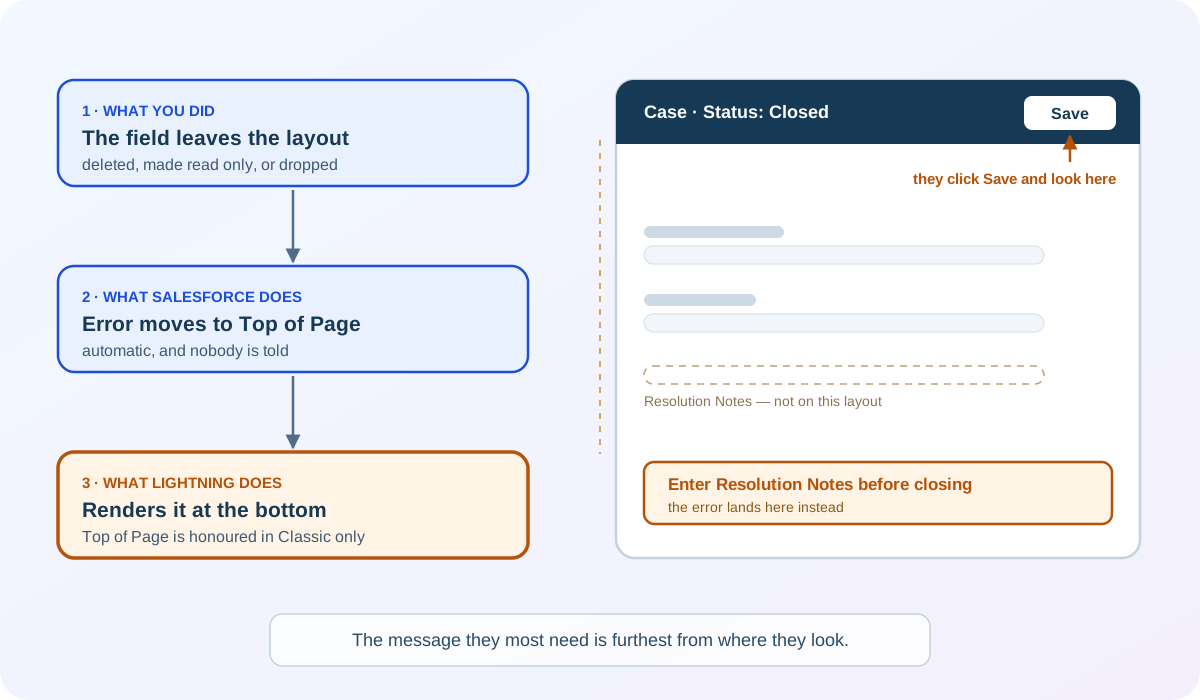
It gets one turn worse. If a validation rule’s error location points at a field that is later deleted, made read only, or left off the page layout, Salesforce automatically moves the error to Top of Page. So the case where the user most needs to be told which field is missing is exactly the case where the message stops being attached to a field at all.
🧭 Write the test plan as a table, not a paragraph
Section titled “🧭 Write the test plan as a table, not a paragraph”A test plan written as prose gets skimmed. A table gets executed, because each row is either done or not done, and an empty result column is visible from across the room.
Every row needs five things: who is running it, what they do, what should happen, what actually happened, and whether that counts as a pass. That last distinction matters more than it looks, because “the record saved” and “the record saved correctly” are different observations, and only one of them is a test.
| # | Persona | Action | Expected result | Actual | Pass |
|---|---|---|---|---|---|
| 1 | Support agent | Close a case with notes filled in | Saves; Follow-Up Date set to today + 7 | ||
| 2 | Support agent | Close a case leaving notes empty | Blocked, with a suitable message naming the field | ||
| 3 | Support agent | Edit an unrelated field on a case closed last month, and save | Saves; the rule is scoped to the transition, so an already-closed case is not blocked | ||
| 4 | Team lead | Bulk-close five cases from a list view | All five save, or all five are refused with a readable reason | ||
| 5 | Integration user | Close a case through the API with notes | Saves; no error in the integration log | ||
| 6 | Integration user | Close a case through the API without notes | Refused with a message the integration owner can act on | ||
| 7 | Support agent | Reopen and re-close a case | Follow-Up Date recalculates from the new close date |
Seven rows, and only one of them is the happy path everyone tests. Rows 3 and 7 are the ones people forget, because they involve records and sequences that already existed rather than the change you just made.
Notice that row 6 does not say “fails”. A refusal is a correct outcome; the test is whether the refusal is usable. An integration that receives a validation error naming a field its owner does not recognise is a support ticket waiting to happen, and you would rather find that now than at two in the morning.
Number the rows and keep them afterwards. They give you something specific to point at in a review, a release note, or an incident: “row 4 passed on 3 September in the user acceptance testing sandbox” is evidence, where “we tested it” is only a claim.
👥 Test as the people who will use it
Section titled “👥 Test as the people who will use it”Your own session is the least representative one in the org, which is awkward, because it’s the one you naturally test in. Two things are wrong with it: your access, and your assumptions. You’re likely testing with about the widest access anybody has. Every field is visible, every record reachable, and your page layout is probably one nobody else uses, so a permission problem stays invisible. And you can’t un-know how the change is meant to work, so you follow the path you built, in the order you built it, and it does exactly what you designed it to do. Testing as yourself proves the change works for you.
Almost every test plan covers the person who asked for the change. Two others cause more incidents and are easy to leave out. The integration user fails silently, because its errors arrive as log entries nobody reads until Monday. The occasional user with an unusual profile hits the change once a quarter, has no idea it changed, and has forgotten whatever training accompanied it. Neither will be in the room for the demo.
Two mechanisms let you get closer to the real thing, and they have different limits worth knowing.
🔑 Log In As another user
Section titled “🔑 Log In As another user”Log In As puts you in that person’s session with their profile, permission sets, page layouts, and record access. It is the closest you get to seeing what they see, and it is how you catch the field-level security trap from the previous section. The Admin Essentials testing chapter covers enabling and using it in detail, so this chapter assumes you have it.
🐞 Debug a flow as another user
Section titled “🐞 Debug a flow as another user”Debugging a flow as another user is the automation equivalent. In Flow Builder, the Debug option walks you through a run element by element, showing the path taken and the values at each step. By default it runs as you, but you can change that.
Two things to settle before you start. This only works in a sandbox — Salesforce does not allow debugging a flow as another user in production, which is a good reason for the change to reach a sandbox before you form an opinion about it. And you will need View All Data and Manage Flow to debug flows at all, which is worth checking before you plan a testing session around it.
-
Enable the setting. From Setup, enter
Process Automation Settingsin the Quick Find box, then select Let admins debug flows as other users and save. -
Open the flow in Flow Builder and click Debug.
-
Select “Run flow as another user” in the debug options and search for the user you want to test as.
-
Run it, and read the debug panel on the right. It shows each element in order, the values it read, and the path it chose.
Three things about the run itself are worth holding onto:
- Debug without rollback is not a simulation. For flow types where rollback mode is optional, leaving it off means the flow performs its actions and database changes as that user. Closing or restarting the run does not undo changes that were already committed, so point callouts at test endpoints and know which mode you selected before you click Run.
- A record-triggered flow debugs in a smaller world than it runs in. It uses rollback mode, so database changes are undone and a Send Email action does not send. Only the current flow is tested; other triggered flows and processes do not run. It can pass in debug and still fail for real. Salesforce’s own advice is to run it in a sandbox outside debug when you want to know how it actually behaves.
- A system-context flow won’t show you a permission problem. You can still debug as another user, but a flow running in system context bypasses their object permissions and field-level access. It will happily write a field that user can’t see, which may be exactly what you want, or may be how an agent ends up with a follow-up date on a case they can’t open.
🚨 Test the paths where it should fail
Section titled “🚨 Test the paths where it should fail”Happy-path testing tells you the change can work. Failure-path testing tells you what the org does when it doesn’t, and that is where the user experience actually lives. A rule that blocks correctly but explains nothing is a rule that generates support tickets.
For each way your change can refuse an action, check three things:
- Does it refuse? The rule fires when it should. This is the part everybody tests.
- Does it explain? The message names the field, says what is needed, and appears somewhere the user is looking. Check the error location rather than assuming it: Top of Page is respected in Salesforce Classic only, and in Lightning Experience those errors render at the bottom of the page, a long way from where somebody who just clicked Save is looking.
- Can they comply? They can actually do the thing the message asks. This is the trap from earlier, and it is the one that turns a small change into a blocked team.
Failure paths are also where you find out what your automation does when something upstream goes wrong. If the follow-up flow depends on a field the validation rule now requires, what happens when the save is refused? Nothing, in that case, because the record did not save. But if the ordering were different, or if the flow ran on a path that partially completed, you would want to know that before production found out for you.
🩺 A worked example: row 4 comes back failing
Section titled “🩺 A worked example: row 4 comes back failing”Everything above describes how to plan a test. This is what it looks like when one actually catches something, because the planning is the part people copy and the diagnosis is the part they improvise.
Row 4 has the team lead bulk-closing five cases from a list view. It passes if all five save, or all five are refused with a readable reason. Here’s what happens when it does neither:
-
Test. The team lead selects five open cases, sets Status to Closed, and saves. Two save. Three are refused.
-
Symptom. Record the person’s words before you interpret them. In this example, the team lead reports: “it closed some of them and complained about the rest, and I can’t tell which.” That sentence is the finding. Resist turning it into a theory yet.
-
Evidence. Reproduce it yourself using the same route they used, not the route you would have chosen. Then open one of the refused cases on its own record page and try the same save. If it succeeds there and fails from the list view, the rule isn’t the whole story and the channel is part of it.
-
Cause. Here the two that saved already had Resolution Notes from an earlier edit; the three refused did not, and the bulk route gave the lead no way to supply notes per record. The rule is behaving exactly as written. The workflow around it is what’s broken.
-
Change. Decide deliberately, and the options are genuinely different: make the field editable in the bulk route, accept that closing requires the record page and say so in the rollout note, or narrow the rule so it applies only to the statuses that truly need a reason.
-
Rerun. Run row 4 again from the same list view, then rerun rows 1 and 2, because a change to the rule’s criteria can quietly alter the paths you already passed.
Step 6 is often skipped. A fix made in response to one failing row invalidates the rows that passed before it, and “we already tested that” is how a second defect ships behind the first.
🔁 Regression testing: checking what you didn’t touch
Section titled “🔁 Regression testing: checking what you didn’t touch”Regression testing is the process of checking that a new change or update didn’t break any features that were already working. It can feel less rewarding than testing the thing you built, but it catches expensive failures because the components you did not change are the ones nobody is watching.
The practical question is how to scope it. Testing the entire org after every change is not a real option, and testing nothing is how functionality breaks. Follow the dependencies outward from the object you touched, one hop at a time, and stop when you run out of things the change could affect.
For our Case change, one hop out could look like this:
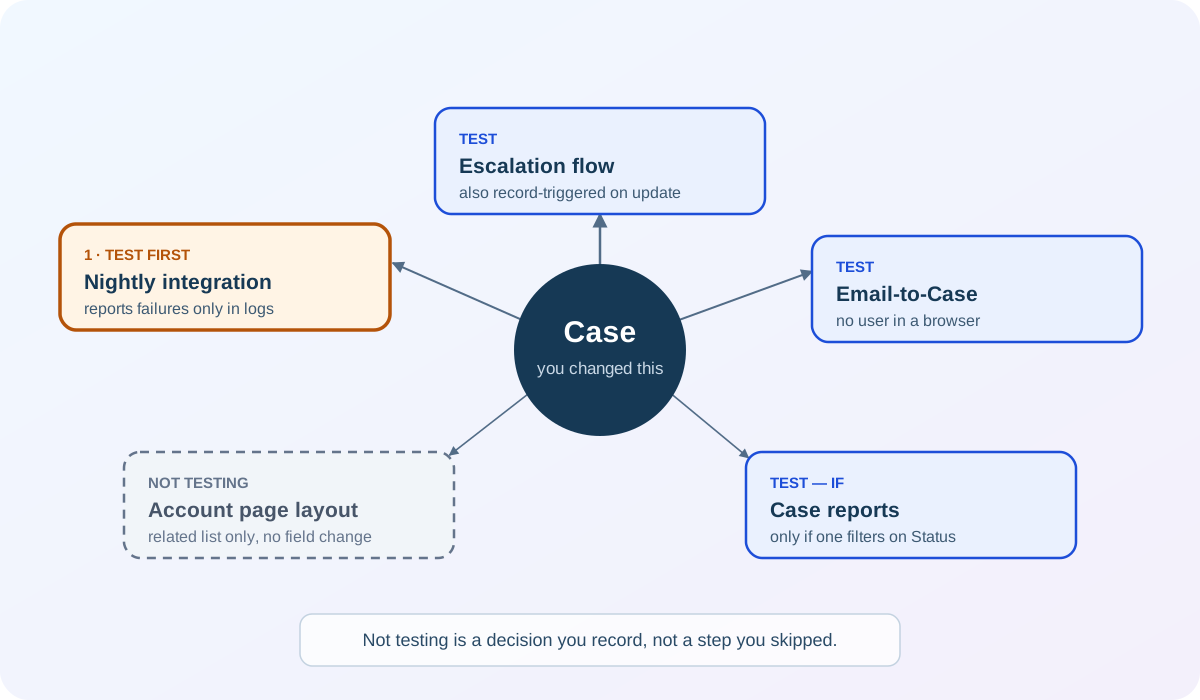
The map is the quick version; the reasoning is in the table below it. A list would give you the same five dependencies, but not the mix: one is urgent, two are ordinary, one is conditional, and one is a deliberate no. That last box is drawn the same size as the others on purpose.
| What else touches Case? | Why this change could affect it | Worth testing? |
|---|---|---|
| The escalation flow | Also record-triggered on Case; both now run on update | Yes |
| Email-to-Case | Creates and updates cases without a user in a browser | Yes |
| The nightly integration closing stale cases | Closes cases in bulk, and will not have Resolution Notes | Yes, first |
| Case reports and dashboards | New field, no change to existing fields | Only if a report filters on Status |
| The Account page layout | Related list only; no Case field changes | No |
That table takes about ten minutes to build, and it does the hard part of regression testing: deciding what to check. The last two rows matter as much as the first three, because deciding not to test something deliberately is different from not thinking of it.
The nightly integration is marked “first” for a reason. It is the test most likely to fail, and its failure reaches an error log rather than the person whose work triggered it. Run the tests most likely to fail earliest, while there is still time to change the design rather than argue for a deadline extension.
🧬 Test the records you already have, and the channel they change through
Section titled “🧬 Test the records you already have, and the channel they change through”Your test records are new, clean, and built to the rule you just wrote. The records already in the org were created under the old rules, by people who left, in states you would not choose. That difference is what catches people out.
Four kinds of difference are worth deliberately sampling:
| Difference | What it looks like on our Case change | How to sample it |
|---|---|---|
| Missing newly expected values | Every case closed before today has no Resolution Notes | Take one, reopen it, and try to close it again |
| Different record types, owners, or statuses | A case owned by a queue, or on a record type with a different layout | One record of each type currently in use |
| Historical states you no longer create | Cases closed under a status that has since been retired | Filter for the values, not the recent ones |
| Bulk saves rather than single records | Five cases closed in one save, with both the escalation and follow-up flows running | Close five at once from a list view, not one from a record page |
The last row is the one that most often behaves differently at scale, and it is why “it worked on one record” is a weaker result than it feels.
The channel matters as much as the record. A rule the interface enforces is a rule an import also has to satisfy: Salesforce runs validation rules on records before they are imported, and records that fail are not imported at all. So a mass update, a data load, or an integration can push thousands of previously untouched records into contact with a rule that has not applied to them before, and the first anybody hears of it is a file of rejected rows.
Test through the channel your users and systems will actually use. A change verified only through the record page has been verified in one of the several ways your org writes to that object.
🔍 Setup Audit Trail: check what else changed
Section titled “🔍 Setup Audit Trail: check what else changed”Your regression scope depends on everything that shipped in this release window, not just your own work. If other people administer the org, Setup Audit Trail is where you find their changes: who changed what, and when. Read it before you draw the dependency map, because somebody else’s change to the same object belongs in your test scope as much as yours does. Org Health & Monitoring covers reading it, and its 180-day retention window, in detail.
🤖 Automate and validate before you ship
Section titled “🤖 Automate and validate before you ship”Manual testing doesn’t scale across releases. A check you will run every time the object changes is worth encoding once, so that it runs whether or not anyone remembers to.
🧪 Flow tests: what they cover and what they don’t
Section titled “🧪 Flow tests: what they cover and what they don’t”Flow tests are the declarative option. From a debug run of a record-triggered flow, Convert to Test saves that run as a repeatable test with its starting record, the values it should produce, and the assertions you want checked. After that, the test runs on demand rather than by hand.
They’re genuinely useful and genuinely limited, and the limits at Summer ’26 (release 262) are specific enough to plan around:
| Aspect | What applies |
|---|---|
| Flow types supported | Record-triggered, autolaunched, and Data Cloud-triggered |
| Flow types not supported | Flows that run when a record is deleted |
| Paths and elements not covered | Asynchronous paths; callouts and wait elements in autolaunched flows |
| Maximum tests per flow | 200 |
| Counts toward flow test coverage | No |
| Test data | Fixed values only; formulas are not supported |
Two of those rows cause real surprises. The first is that flow tests do not count toward flow test-coverage requirements, so building them is a quality decision rather than a deployment one; they will not get a deployment over a coverage line.
The second is subtler and will eventually make a test lie to you. Because test data uses fixed values rather than formulas, a relative date is frozen at the moment you create the test. A test built on 3 August that expects Today records the literal value 3 August, and it keeps expecting 3 August next March.
Our follow-up-date flow is exactly this shape. A flow test asserting “today plus seven” needs its data updated by hand, or it drifts from passing-because-correct to passing-because-nothing-checks-it. Date-relative logic is often better verified by a person, and knowing which of your tests are load-bearing is worth more than a green tick.
Winter ’27 (release 264) starts to move this. Test Mode (Beta) brings debugging and testing together in Flow Builder, with saved scenarios and assertions; mock outputs for Action and Subflow elements, also in beta, let you test a flow that calls an external service or a subflow without the dependency running; and scenarios can be generated from the terminal. The table above describes what a production org runs until its Winter ’27 upgrade lands, and the rollout spans three weekends between 5 September and 12 October 2026. The date-drift point is unchanged by any of it. Winter ’27 Flow: Testing, Retries, User Context covers the new mode in detail, including what its coverage number does and doesn’t tell you.
For developers reading this section: Apex tests cover the code path, and the same reasoning applies to what they assert. A test that asserts a record saved is weaker than one asserting the field holds the right value, and much weaker than one that also runs System.runAs for a restricted user. Make the database access mode explicit in that test: API version 67.0 and later defaults database operations to user mode, while earlier versions default to system mode. Explicit user-mode queries and DML keep the permission test’s intent stable when an API version changes. Testing & Deployment in the development track goes into test structure properly.
📋 Validation-only deployment and quick deploy
Section titled “📋 Validation-only deployment and quick deploy”Testing behaviour and testing deployability are two different activities, and passing one doesn’t tell you much about the other. A change can work perfectly in a sandbox and still fail to deploy because a dependency is missing from the package.
A validation-only deployment runs a deployment without saving anything. You get the same success and failure messages a real deployment would produce, with none of the consequences. It is the cheapest way to find a missing dependency, and there is very little reason to skip it on a change of any size.
It also earns you something. If the validation succeeded, ran Apex tests, and met coverage requirements, you can follow it with a quick deployment that skips re-running the tests. The conditions are specific:
- the components were validated successfully for that target within the last 10 days;
- the Apex tests ran as part of that validation and passed; and
- coverage requirements were met, which means at least 75% overall when running all tests or all local tests, with triggers having some coverage, or at least 75% on each deployed class and trigger individually when running specified tests.
Two details are worth knowing before you rely on it. In sandbox deployments, Apex tests are not required and are not run by default, so a sandbox validation that “passed” may not have tested anything at all unless you chose a test option explicitly. And any deployment to that org after a validation disqualifies every outstanding validation for quick deploy, including a package installation, so you revalidate rather than assuming your earlier result still stands.
All of this describes doing it yourself from Setup. If your team deploys through a CI/CD pipeline, the same two steps exist as commands: sf project deploy validate returns a job ID, and sf project deploy quick --job-id <id> deploys that validation without re-running the tests. What changes is who runs them and when, not the reasoning behind them. It does make the disqualification rule above easier to trip: in a shared pipeline, a release you had nothing to do with can retire your validation, and the Quick Deploy button appears only for validations that still qualify. Sandbox Strategy & Change Management, the next chapter, covers how those pipelines connect to day-to-day delivery.
Trailhead covers the flow-test side of this with a hands-on unit, and two superbadges test the skills this chapter is really about: finding out why a flow a user reported is misbehaving, and building the fault handling that stops the next one taking a record down with it. Both are worth doing after the Case follow-up flow is tested rather than before, so you are applying the method rather than learning it twice.
📐 Scale the test to the risk and the environment
Section titled “📐 Scale the test to the risk and the environment”Everything so far describes the full version. Run it on every change and you will stop running it, so the honest question is what to keep when the change is small or the environment is poor.
The principle is the same in both cases: match the evidence and the review to the risk, and be explicit about what you did not test rather than quietly leaving it out.
🕙 The ten-minute version
Section titled “🕙 The ten-minute version”For a low-risk change — a new optional field, a report tweak, a help text correction — the whole method collapses to three rows, one regression decision, and one rollback trigger:
| # | Persona | Action | Expected result | Actual | Pass |
|---|---|---|---|---|---|
| 1 | The person who asked for it | The new thing, on a record they own | Produces the specific value or state they asked for | ||
| 2 | A user on a different profile | The task they did yesterday | Finishes as it did before, with no new error and nothing missing from the page | ||
| 3 | Whoever the refusal lands on | The one failure the change can cause | Refused, with a message naming the field and what to do about it |
Add one line naming what else touches the object and whether you checked it, and one line saying what would make you switch the change off. That is ten minutes, and it is enormously better than nothing.
What does not scale down is the review. A low-risk change may need no formal sign-off, but somebody other than the builder should still know it happened. Risk decides how much evidence you gather, not whether anybody else is told.
🧯 When the sandbox has no production data
Section titled “🧯 When the sandbox has no production data”The Sandbox type can decide what you are testing against, and the difference is stark. Developer and Developer Pro sandboxes copy your org’s configuration only and contain no production records. Partial Copy adds a sample of production data defined by a sandbox template, while a Full sandbox can include all production records.
So on a Developer sandbox you are not testing real data, you are testing your metadata against records you invent. That is workable if you invent the right ones. Build a small set of deliberately awkward records rather than convenient ones:
- one record in each state your rule treats differently, including the historical ones;
- one owned by a queue and one owned by an inactive user;
- one of each record type still in use; and
- a handful created or updated in one bulk operation, so batch behaviour has something to act on.
Prefer representative synthetic records when they can reproduce the risk. If production data is genuinely necessary and your data-handling rules allow it, copy only the minimum useful extract and mask or anonymise sensitive values before people use the sandbox. The import itself has to satisfy your active validation rules, so a rule that blocks it is a finding rather than an obstacle.
🤝 When somebody else tests for a living
Section titled “🤝 When somebody else tests for a living”If your organisation has a tester, a QA analyst, or a business analyst who runs user acceptance testing (UAT), this chapter doesn’t get handed over. It gets split. You keep what only the builder knows: what the change is meant to achieve, who it touches, and where you already suspect it’s thin. They take the part you’re worst at, which is finding the cases you didn’t think of.
Walking them through it is the usual mistake. Demonstrating the change feels efficient, but once they’ve watched your happy path they’re working from your assumptions instead of their own, and their independent judgement is exactly what you brought them in for. Hand over the intent and the access, not the route. Give them the test plan as a starting point rather than a checklist to hand back, because the rows they add are the ones you could not have written.
Testing well is a different skill from building, and it isn’t the junior end of delivery. A good tester works through the angles your own mental model leaves out: what happens on the record you didn’t create, through the channel you didn’t use, as the user you didn’t think to become. Those are the three questions this chapter is built around, and somebody who asks them every day will find the gaps faster than you will. Brief them properly, then get out of the way.
One thing doesn’t transfer. The rollback trigger stays with you and the business owner: a tester finds defects, but releasing and reversing belong to whoever owns the consequences.
👤 When you are the only Salesforce person
Section titled “👤 When you are the only Salesforce person”Sign-off does not require another admin. It requires somebody who cares whether the change works, which is usually the person who asked for it. Walking the business owner through the test plan gets you most of the value: they will query an expected result you took for granted, and that is the entire point of the exercise.
When nobody can review the technical side, write the plan for the person who inherits your org. Explaining it to someone with none of your context makes you write down the steps you were keeping in your head, and the step you struggle to write is usually the one you had not finished thinking about.
🚧 When a path genuinely cannot be tested
Section titled “🚧 When a path genuinely cannot be tested”Some paths cannot be exercised before release: an integration whose vendor has no test endpoint, a scheduled job that runs monthly, a partner portal you cannot log into. The mistake is not failing to test them. The mistake is letting that gap go unrecorded, so the risk quietly becomes an assumption.
Write the untested path down as untested, name why, and say what you will watch instead:
The nightly integration path could not be exercised; the vendor’s sandbox endpoint is unavailable. First production run is 02:00 Thursday. The on-call admin checks the error log at 08:00 Friday, and the rollback trigger below applies.
A monitored first production run with a rollback ready is a legitimate risk control. It is not a substitute for testing what you could have tested, and it should not be the plan for a path you simply did not get around to. The difference between the two is whether you can name the reason.
🧾 Evidence, sign-off, and the rollback trigger
Section titled “🧾 Evidence, sign-off, and the rollback trigger”Testing should leave you with more than your own confidence that the change is fine. It should leave a short record somebody else could read, made of three things they could act on.
Evidence is the completed test plan: the numbered rows, who ran each one, in which environment, on what date, and what actually happened. Screenshots for the results that would be contested. Deployment validation output. It doesn’t need to be elaborate. It needs to exist somewhere other than your memory, because in three months the question will not be “did it work” but “what exactly did we check”.
Sign-off is a named person other than the builder agreeing the change can go. Not a committee and not a process. It does matter who, though: somebody with a reason to care whether it works, and close enough to the day-to-day to challenge an expected result. For our change that is the support manager who asked for it. Explaining a change to somebody who did not build it is the most reliable way to notice you skipped something.
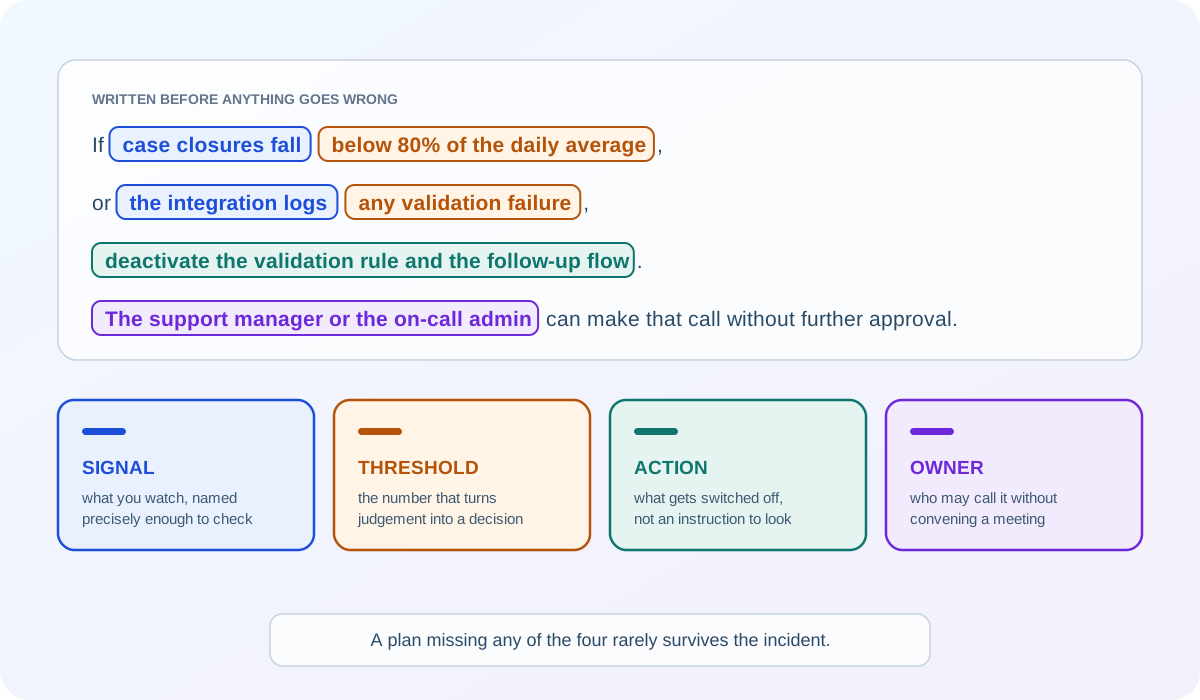
The rollback trigger is the part almost nobody writes down, and the part that matters most at the worst moment. Decide before releasing what evidence would make you reverse the change, and who is allowed to make that call without convening a meeting. For our example:
If case closures fall below 80% of the daily average, or the integration logs any validation failure, deactivate the validation rule and the follow-up flow. The support manager or the on-call admin can make that call without further approval.
That is two sentences, written before anything has gone wrong, and it turns a stressful judgement call into a decision that was already made. It names a signal, a threshold, an action, and an owner. Leave one out and the argument starts exactly when you can least afford it: what counts as bad enough, and who gets to say so.
Notice too that the rollback action here is deactivating two components rather than redeploying anything. That is worth designing for. When you build a change, ask how it would be switched off, because the answer decides what being wrong will cost you.
This is one of the practical arguments for the configuration patterns in the previous chapter: a threshold held in a custom metadata record can be changed by an admin in a minute, while the same number inside a formula needs a deployment.
From experience: I helped work on a change that added a new field for the sales team. It was tested thoroughly, deployed to production, verified, and everyone was happy with the rollout. A few weeks later, incidents started trickling into our own support queue. Nobody had considered that support agents would need that field when customers got in touch, whether the query was about the information itself or the field was simply context they needed on the call. Sales were capturing it exactly as designed, and support were handling those conversations without being able to see it, because the field had never been added to their page layout. The build itself was sound; the gap was the test plan, which had missed one persona. After that, every new field came with a check of who else would need to see it, not only who would fill it in. It’s also worth noticing what didn’t happen: no error, no failed save, no number dropping through a threshold. A rollback trigger watches for the change misbehaving, and this one behaved perfectly for everyone it had been tested with.
🧠 Final Thoughts
Section titled “🧠 Final Thoughts”Watching a change work proves that it works for you, in your session, on the record you chose. That is a real result, but a small one. Everything else is where most incidents come from.
The habit that covers that ground is smaller than a process. Before you ship a change, ask who else touches this object, and what happens to them if you are wrong. Those two questions produce most of a test plan on their own, and they scale down to a five-minute change as comfortably as they scale up to a release.
Test plans improve your odds of catching a problem before release. Of everything you write down, the rollback trigger is not the one to skip, because it decides what happens when you don’t, and it is the only one that gets read under pressure.
None of this needs specialist tooling. A table, a session as somebody else, and a validation run catch defects that an administrator-only happy-path test cannot. The sophistication can come later.
Hand the plan to a colleague who was not involved and ask them to run the hardest row. If they get through it without turning to you, you have a test plan. If they need you sitting beside them, you have notes.
🚀 Next steps
Section titled “🚀 Next steps”You now have a way to prove a change is safe. The next chapter is about moving it. In Salesforce Sandbox Strategy and Change Management, you will give each sandbox a purpose and a refresh cadence, compare orgs before deploying, and build the release discipline that carries a tested change into production without surprises. The test plan you have just written is what that pipeline exists to protect.