Salesforce Record Access: OWD, Roles, and Sharing Rules

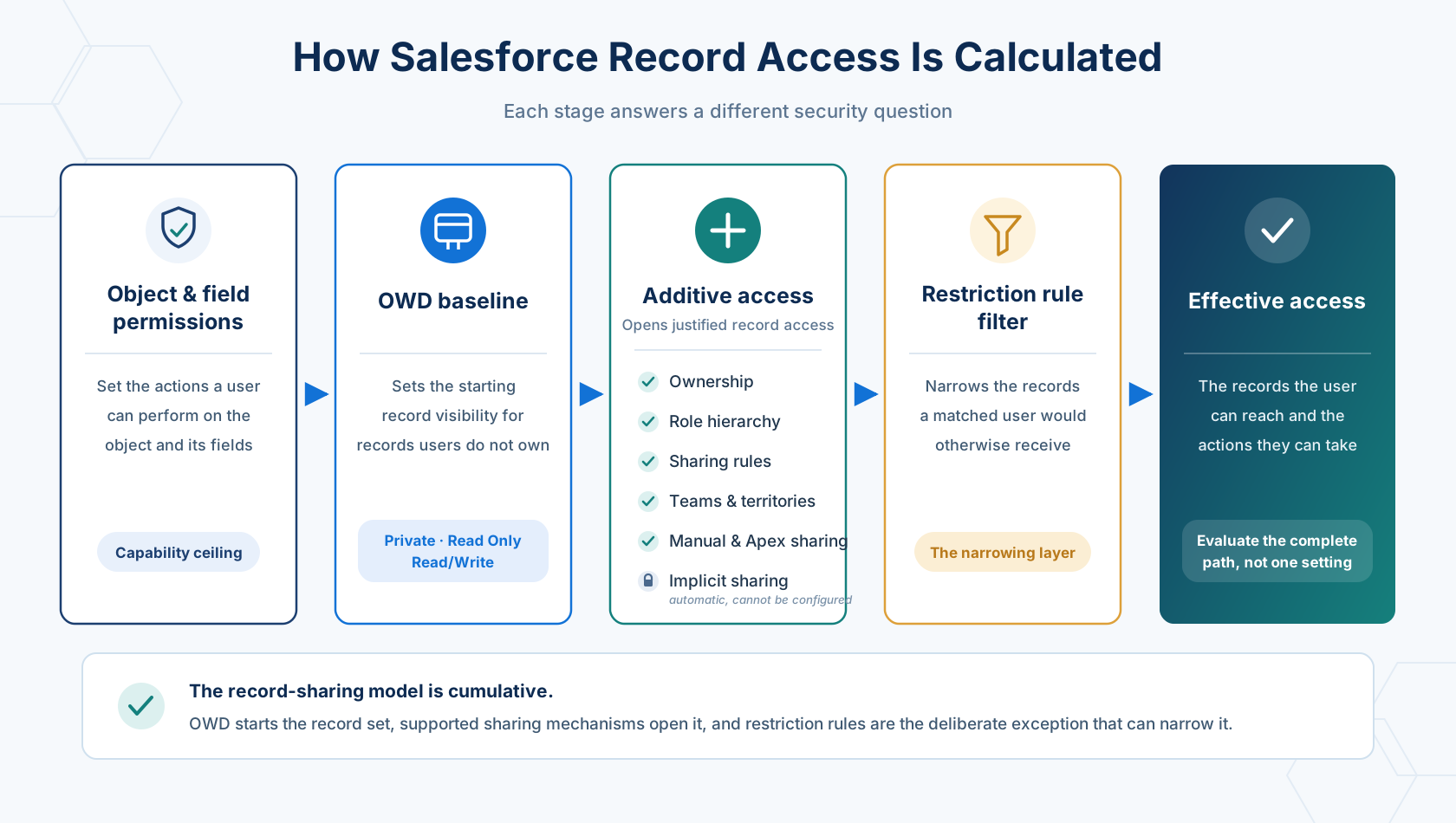
Record access in Salesforce is decided in layers. Object permissions and field-level security set what someone can do with a kind of record. The organization-wide default sets the baseline for records they don’t own. Ownership, the role hierarchy, and sharing rules add access on top; restriction rules subtract from it. Effective access is what survives every layer.
Object and field permissions settle one question: what can this user do with a kind of record? They leave a second question untouched: which records of that kind can they access? The two are separate, but effective access depends on both. Give someone Read on Account and they can work with accounts, but nothing in that grant says which accounts. Log in as that user and the Accounts list view can come back empty while the org holds thousands of them. Those records exist. They just aren’t shared with that user, so the list has nothing to show, and that isn’t a bug. It’s the sharing model doing its job.
This chapter is about the second question. Given a specific record and a specific person, can they reach it, and what granted or withheld it? It sounds like a narrow question to build a chapter around. In practice, record access is easy to get wrong, and it fails in two opposite directions whose symptoms look nothing alike.
Too restrictive, and you get a steady drip of support requests from people who cannot see what they need. Too permissive, and you get compliance exposure and a quieter problem: users stop trusting that the org reflects who should see what. I have seen both in production.
In the orgs I’ve worked on, the root cause has often been the same. Sharing decisions get made early in an implementation, under pressure, before anyone has seen how the org will really be used. That’s fine, and often unavoidable. What isn’t fine is treating those early answers as settled. Going back to check them is often the step that gets skipped.
Everything here builds towards one thing: looking at a record and a person and predicting the answer before you check it. Once you can do that, everything else in this area stops being guesswork.
🧭 How Access Is Decided
Section titled “🧭 How Access Is Decided”Record access isn’t one setting. A user’s effective access is what’s left after several layers have each had their say, and the layers run in a fixed order. Learning the order matters more than memorising any individual mechanism, because it tells you where to look when the answer is wrong. Each layer gets its own section later; what matters here is the sequence.
Page layouts and record types shape what someone sees on screen, but neither is a security control. Hiding a field from a layout doesn’t secure it, and making a record type available doesn’t grant access to its records.
-
Can the user access the object and fields? Profile and permission sets must grant the object permission the action needs, and field-level security must expose the fields involved. If they can’t read the object, no amount of sharing will make one of its records visible.
-
What do the Organization-Wide Defaults (OWD) give them? They set the starting point for records the user doesn’t own. Private starts closed; Public Read Only and Public Read/Write start open.
-
Does something open the record? Ownership, the role hierarchy, sharing rules, manual shares, implicit sharing, teams, territories, and Apex sharing each add access. Broad permissions such as
View All RecordsorView All Databypass the record-sharing path entirely. -
Does a restriction rule filter the result? A restriction rule removes records from the set the user would otherwise receive, filtering an existing result rather than replacing OWD or the sharing model. Support is narrow: custom objects, external objects, contracts, events, tasks, time sheets, and time sheet entries, with up to two active rules per object on Enterprise and Developer editions and five on Performance and Unlimited.
-
Does the action fit both layers? The user needs the record access and the matching object permission. Edit access to a record is worth nothing if they only hold Read on the object.
Sharing is additive: the user keeps the most permissive grant their object permissions allow, and a weaker grant never reduces a stronger one. A Read Only sharing rule doesn’t downgrade someone who already has Edit through ownership. The only layer that subtracts is a restriction rule, which is why it sits apart at step 4.
🧪 Follow One Record Through the Model
Section titled “🧪 Follow One Record Through the Model”Take a custom Project__c object with OWD set to Private, and walk one record through every layer:
- Mia owns the Project, so ownership gives her access, bounded by her object and field permissions.
- Mia’s manager sits above her in the hierarchy, so the manager inherits access when Grant Access Using Hierarchies is enabled for that object.
- The Delivery Assurance group sits in another branch, so the hierarchy gives it nothing. A criteria-based sharing rule grants it Read Only where
Risk_Level__c = 'High'. - A contractor needs one temporary exception, so Mia grants a manual share on that single Project rather than opening every high-risk one.
- Another user holds Read on
Project__cbut receives no record access, so they still can’t see Mia’s Project. The object permission was never what stood in their way.
That’s the whole mental model: permissions set the ceiling, OWD sets the baseline, sharing mechanisms add justified access, restriction rules filter what’s left. When access is wrong, the useful question is which layer should have granted or blocked it, not which setting you can change fastest.
👥 Who Can Receive Access
Section titled “👥 Who Can Receive Access”Sharing rules and manual shares both grant access, but they don’t always offer the same target list. A manual share can reach one named user, while reusable audiences are normally represented by groups. The exact choices depend on the mechanism, the object, and whether territory features are enabled.
| Sharing target | What it represents | Reach for it when |
|---|---|---|
| User | One named person | One record needs a genuine exception through manual sharing |
| Public group | An admin-maintained set of users, roles, or other public groups | Access follows a business grouping that isn’t the org chart |
| Role | Users assigned to one role; hierarchy-based access can extend the grant upwards | Access starts at one level of the role hierarchy |
| Roles and Internal Subordinates | Users in one internal role branch; hierarchy-based access can extend the grant upwards | A manager’s branch needs the same access |
| Territory grouping | Users associated with a territory, optionally including descendant territories | Access follows a territory model rather than the role hierarchy |
Public groups can contain other public groups. That makes them flexible, but it also means the name on a sharing rule can hide a much larger audience. When you audit a rule, expand every nested group and verify the people at the end of it.
Queues solve a different problem. A queue is a shared record owner and work pool, and it has members rather than recipients. Those members can include individual users, roles, public groups, territory groupings, and other supported group types. Reach for a queue when work should be picked up by whoever is available; use a public group when you need a reusable sharing audience.
Teams and Enterprise Territory Management sit alongside sharing rules as separate access mechanisms, not extra recipient types. Account, Opportunity, and Case Teams grant record-level collaboration to named team members; Enterprise Territory Management grants access through territory assignments. Both carry enough configuration to deserve their own treatment later in the Admin path.
🧰 Choose the Mechanism That Matches the Requirement
Section titled “🧰 Choose the Mechanism That Matches the Requirement”Once the order is clear, let the requirement pick the simplest mechanism that satisfies it:
| Requirement | Start with |
|---|---|
| Set default visibility for internal and external users | Organization-Wide Defaults |
| Give managers access to records owned by people below them | Role hierarchy |
| Open predictable access for a group of records and users | Ownership- or criteria-based sharing rule |
| Grant an exceptional share on one record | Manual sharing |
| Let a named set of people collaborate on one record at different levels | A team, on a supporting object |
| Grant access along a geographic or segment structure | Enterprise Territory Management |
| Express a sharing rule that declarative tools can’t | Apex sharing, with explicit ownership and tests |
| Filter records from users who would otherwise receive them | Restriction rules |
The first four rows are this chapter, and between them they cover most real requirements. The last four are covered in Advanced Sharing and Scale.
🧱 Organization-Wide Defaults
Section titled “🧱 Organization-Wide Defaults”Organization-Wide Defaults set the baseline access users get to records they don’t own. Set that baseline as restrictively as the business genuinely allows, then open access back up deliberately. Working the other way (starting open and clamping down later) means every tightening is a change that takes access away from people who already have it, which is a much harder conversation.
🔐 OWD Access Levels
Section titled “🔐 OWD Access Levels”Available values vary by object and by whether you’re setting internal or external access. Salesforce’s OWD access-level reference lists the full set per object; these three cover most decisions:
- Private: Users get no automatic access to records owned by others. The owner and users above them in the hierarchy can view, edit, and report; everyone else needs another mechanism.
- Public Read Only: Anyone with Read on the object can view and report on every record. Editing stays with the owner, users above them, and anyone granted more elsewhere.
- Public Read/Write: Anyone with the matching object permissions can view, edit, and report on every record. It doesn’t automatically let everyone transfer, delete, or reshare.
A few more are object-specific. Controlled by Parent matches the child to its parent action by action: you can edit a Contact only if you can edit its Account. That’s an OWD choice on objects like Contact and Order; a custom object on the detail side of a master-detail relationship gets the same behaviour structurally and has no OWD of its own. Public Read/Write/Transfer adds transfer for Cases and Leads, though deleting the record or changing its sharing still belongs to the owner. Public Full Access adds transfer and delete for Campaigns. Price Books, Calendars, and Activities have their own sets again.
Choosing Private when the business never required it is the mistake nobody reports. On one org I worked on, a key object had been set to Private at implementation even though every user was meant to see every record. Nothing broke. But each time a new team arrived, someone had to widen a sharing rule or add another criterion to keep visibility intact, and the answer to “who can see this object?” ended up spread across many rules instead of one setting. Private was never the security requirement. It was just the setting that felt safest on day one, and the org kept paying for that instinct in maintenance every time it grew.
🔧 Set the OWD Baseline
Section titled “🔧 Set the OWD Baseline”Configure this from Setup → Sharing Settings. Treat it as an architecture decision rather than a setup task, because changing it later moves access for a large number of users and records at once.
-
Open Sharing Settings and select Edit in the Organization-Wide Defaults section.
-
Set Default Internal Access per object, based on the broadest access every internal user should have by default.
-
Set Default External Access where the org has Experience Cloud or other external users. Reflect what they genuinely need rather than mirroring the internal setting out of convenience.
-
Review Grant Access Using Hierarchies for custom objects, and decide whether managers should inherit access at all.
-
Save, watch the recalculation, then validate with representative users and records.
🔼 Understanding “Grant Access Using Hierarchies”
Section titled “🔼 Understanding “Grant Access Using Hierarchies””For a custom object whose OWD isn’t Controlled by Parent, this setting decides whether the role hierarchy can grant access to its records at all. For standard objects it can’t be changed, and it’s enabled for most of them, though not all.
Disabling it doesn’t lock managers out. Ownership, broad permissions, and configured shares still work; it only stops access flowing upward automatically, which is occasionally exactly what a sensitive custom object needs.
🪜 The Role Hierarchy
Section titled “🪜 The Role Hierarchy”The role hierarchy is how record access passes upward. It reads the Role assigned to each User record, not the profile, not permission sets, not the Manager field, and not the job title. It often resembles the org chart, but its actual purpose is to model who needs access to whose data, and those two things diverge more often than people expect.
When hierarchical access applies, someone in a higher role inherits access to records owned by or shared with users below them. The hierarchy preserves the record-level grant it rolls up. A Read Only share stays Read Only for users above its recipient; ownership, by contrast, gives users above the owner the owner-level record grant. The person higher in the hierarchy still needs matching object and field permissions, so those permissions can reduce what they can do but cannot turn a Read Only share into Edit.
Two things the hierarchy never does, both of which cause confusion:
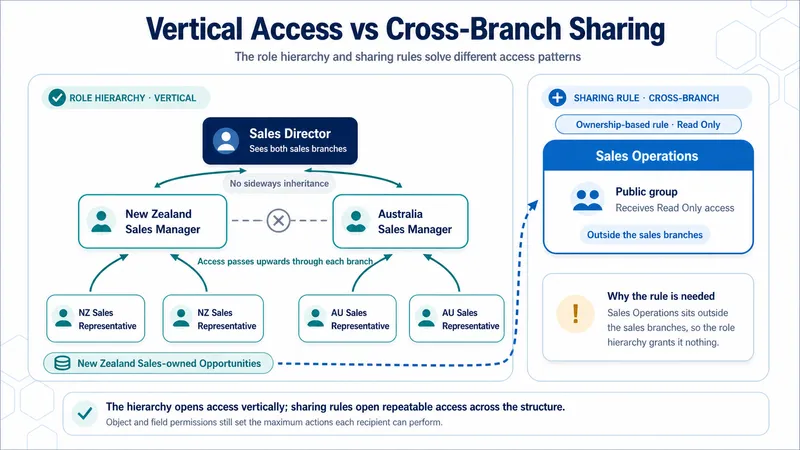
- It doesn’t share sideways. Two reps in the same role get nothing from each other. Peers are invisible to peers unless something else grants access.
- It doesn’t cross branches. A manager in one branch inherits nothing from another branch, however senior they are, unless they sit above it.
📈 How the Hierarchy Changes the OWD Result
Section titled “📈 How the Hierarchy Changes the OWD Result”How much the hierarchy does depends entirely on the baseline underneath it. Under Private it carries nearly all the access; under Public Read/Write there’s almost nothing left for it to carry. The table below covers the ownership case: what users above the record owner gain at each OWD baseline. Access received through sharing also rolls upwards, but at the same level: Read Only stays Read Only, and Read/Write stays Read/Write.
| OWD baseline | What the hierarchy adds for users above the owner |
|---|---|
| Private | View, edit, and report: the same access the owner has, bounded by the user’s own object permissions. Without it there’s no route to the record at all. |
| Public Read Only | Edit. Everyone can already view and report, so editing is what passes upward. |
| Public Read/Write | Nothing for viewing or editing, since everyone already has both. Deleting a record and changing its sharing stay with the owner. |
🧩 Designing Roles That Hold Up
Section titled “🧩 Designing Roles That Hold Up”- Design around access, not titles. Two job titles with identical access needs are one role.
- Separate role creation from role assignment. Don’t create a role just because a job title exists; roles represent distinct record-access needs, not HR grades. Where role-based reports or forecast rollups matter, assign each user to the appropriate existing role.
- Keep it shallow. Salesforce recommends no more than 10 levels of branches. Extra depth costs recalculation time and makes access harder to reason about.
- Watch high-volume ownership. If one user will own more than 10,000 records, read the ownership-skew guidance before assigning them a role, a scale problem covered in Advanced Sharing and Scale.
- Write down the intent: why each role exists, who belongs in it, what should pass upward.
🧬 Sharing Rules
Section titled “🧬 Sharing Rules”A sharing rule is an automatic, maintained exception to OWD. Reach for one when a predictable group of users needs access to a predictable set of records, and the hierarchy doesn’t already provide it.
Sharing rules only ever open access. Salesforce applies a rule to existing and future matching records, and recalculates when ownership, criteria, or group membership changes. That maintenance is what makes a rule more durable than a manual share, and also what makes a badly scoped one expose far more than intended, quietly, for as long as it exists.
🆚 Choose the Rule Type
Section titled “🆚 Choose the Rule Type”- Ownership-based: Selects records by who owns them, using a role, territory, or group. Use it when access follows an organisational boundary: Opportunities owned by the New Zealand Sales role, shared with Sales Operations.
- Criteria-based: Selects records by field values, regardless of owner. Use it when the data drives access: Accounts where
Service_Region__c = 'New Zealand', shared with the New Zealand Service group.
Guest user sharing rules are a separate case: they grant Read Only to unauthenticated site visitors, and belong to a security design rather than ordinary collaboration.
📝 Define the Rule in Three Parts
Section titled “📝 Define the Rule in Three Parts”- Source records: The ownership grouping or field criteria that decides which records qualify.
- Recipients: A public group, role, Roles and Internal Subordinates group, or territory grouping. For a genuine one-record exception, use manual sharing instead.
- Access level: The least that meets the requirement, normally Read Only or Read/Write. The rule can’t override object or field permissions: someone with only Read on the object still can’t edit, and a read-only field stays read-only.
Configure sharing rules from Setup → Sharing Settings. Salesforce’s Create Sharing Rules carries the full procedure, including the guest user and User-object variants.
🚦 Design and Test It Safely
Section titled “🚦 Design and Test It Safely”- Check the OWD first. Rules open a Private or Public Read Only baseline. If the recipients already have Public Read/Write, the rule adds nothing.
- Name the outcome.
Share New Zealand Opportunities with Sales Operations - Read Onlyaudits well.Opportunity Sharing Rule 1does not. - Treat membership as security configuration. Nested groups, role groupings, and territories all expand the real recipient set beyond the name on the rule.
- Test both sides, including the case people skip: access changes correctly when a record stops qualifying.
- Know the limits. Up to 300 sharing rules per object, including up to 50 criteria-based or guest user rules, where those types are supported.
Between them, the hierarchy and sharing rules solve two different directions of access: vertical inheritance, and deliberate access across the structure.
💡 A Criteria-Based Rule in Practice
Section titled “💡 A Criteria-Based Rule in Practice”Marketing needs Read Only access to Accounts with annual revenue above $1 million, regardless of who owns them. The phrase regardless of owner matters: the data decides whether the record qualifies, so this is a criteria-based rule rather than an ownership-based one.
- OWD: Account is Private.
- Source records: Accounts where Annual Revenue is greater than
1,000,000. - Recipients: The
Marketingpublic group. - Access level: Read Only.
Marketing group members can now read qualifying Accounts, provided they also hold Read on the Account object. The rule doesn’t expose non-qualifying Accounts, grant Edit, or downgrade someone who already has stronger access through ownership or another mechanism.
Test the rule with an Account owned outside Marketing’s hierarchy branch, so no other route hides what the rule is doing. Confirm that a marketer can read a qualifying Account but not edit it, cannot open a non-qualifying Account, and loses the rule-based access when Annual Revenue drops below the threshold.
🤝 Manual Sharing
Section titled “🤝 Manual Sharing”Manual sharing grants one-off access to a single record, and it’s the right tool for a genuine exception. It’s the wrong tool for anything a team does routinely. Once it becomes the normal collaboration model, nobody can answer “who can see this?” without opening every record.
The Sharing action appears only where the object, OWD, permissions, and Lightning page configuration all support it. The owner and users with sufficient access can grant Read Only or Read/Write, and the share can’t reduce access the recipient already has.
The behaviour that surprises people is what happens on transfer: manual shares are removed by default when the record owner changes. That usually surfaces months later, when a reassignment silently drops access somebody was relying on. If access must survive a transfer, use a mechanism that isn’t tied to the current owner.
Give every manual share an owner and a review trigger. “Why does this exist and when should it go away?” is a question with an answer on the day it’s granted, and no answer at all six months later. Finding them again is the other half of that promise. Sharing Hierarchy lists them on a record, and the object’s share records carry them with a RowCause of Manual, which is the steadier route when someone holds several overlapping grants.
🔗 Implicit Sharing
Section titled “🔗 Implicit Sharing”Here’s the layer that most often makes a Private org behave in ways an admin didn’t predict. Salesforce grants some access automatically between Accounts and their standard child objects. The mechanism is built into the platform rather than exposed as a separate switch. Think of it as access moving along the Account relationship in two directions.
🔄 What Passes Between Account and Child Records
Section titled “🔄 What Passes Between Account and Child Records”| Direction | What happens |
|---|---|
| Upward: child → Account | If a user owns or receives shared access to a Case, Contact, or Opportunity, they gain implicit Read Only access to its parent Account, even when Account OWD is Private. Access held only through View All Records or Modify All Records doesn’t trigger this grant. |
| Downward: Account → children | Account ownership can also grant the Account owner access to child Contacts, Opportunities, and Cases that other users own. The access level comes from the Account owner’s assigned role. |
The upward grant lets the child record make sense in context. Its exception also explains why broad object permissions aren’t a neutral substitute for a deliberate sharing design: they bypass the sharing model rather than behaving like an ordinary share.
Each role has separate Contact Access, Opportunity Access, and Case Access settings. For Account owners assigned to that role, the settings decide whether this implicit grant gives Read Only, Read/Write, or No Access to the corresponding child records. Object and field permissions still set the ceiling.
🧾 What the Tools Show
Section titled “🧾 What the Tools Show”How you confirm implicit access depends on its direction.
| Direction | Evidence |
|---|---|
| Upward | Salesforce creates a stored AccountShare row. On the parent Account, Sharing Hierarchy reports Associated Record Owner or Sharing. Overlapping Owner or Manual Sharing reasons can be compressed into one most-permissive entry, so the result is clearest when the implicit grant is the user’s only route to the Account. |
| Downward | Salesforce calculates the access when the child record is requested. ContactShare, CaseShare, and OpportunityShare therefore contain no ImplicitChild row for this grant, even though the Account owner can still have access. |
That dynamic calculation is the practical effect of release updates enforced for Cases and Contacts in Winter ’24 and Opportunities in Spring ’24.
When the child is Controlled by Parent, or its OWD already gives the same access, Sharing Hierarchy may be unavailable or omit the user because the implicit grant doesn’t exceed the baseline. Use UserRecordAccess to confirm effective access when the hierarchy view can’t distinguish it.
The simple version: implicit sharing carries access along a few standard Account relationships. Access can move up from a Contact, Opportunity, or Case to its Account, or down from an Account owner to those child records. The upward grant is Read Only; the downward grant follows the Account owner’s role settings. Object and field permissions still limit both directions, and custom objects receive neither grant.
🔍 When Someone Cannot See a Record
Section titled “🔍 When Someone Cannot See a Record”Start by confirming which object is actually failing. The one throwing the error isn’t always the one at fault, because a user denied a Case may be blocked by their access to its parent Account. If the record has a parent, check the parent first.
From there, most access complaints are resolved by three checks, in order. Run them before you touch any configuration, and stop as soon as one of them explains the result.
-
Check the object permission. Open the affected user’s record and use User Access Summary to confirm they hold the object permission the action needs: Read to view, Edit to change. If they don’t, you’ve found it, and no sharing change would have helped.
-
Check the OWD. In Setup → Sharing Settings, look up the object’s baseline for the relevant internal or external user type. If it’s Private and the user doesn’t own the record, they were always going to need something else. If it’s Public Read Only and they’re trying to edit, the baseline was never going to give them that.
-
Check Sharing Hierarchy on the record. Open the record, select Sharing Hierarchy, and look at who has access and why. This is the only one of the three that tells you the reason for a grant rather than just its possibility, which makes it the most useful and the one to reach for when the first two look fine. One caveat: where restriction rules are supported, the list can include users a rule is actually blocking. Select View beside a name and Salesforce confirms the block.
Those three resolve most real complaints. When none of them explains what you’re seeing (the permissions are right, the baseline is right, and Sharing Hierarchy shows a grant that shouldn’t exist or omits one that should), the answer is somewhere further in, and Access Troubleshooting carries the full documented method, the tooling, and how to record what you find as evidence.
One habit worth forming now: write down what you expected before you check. An investigation where you never committed to a prediction is very easy to end by finding an explanation rather than the explanation.
🚧 When Declarative Sharing Runs Out
Section titled “🚧 When Declarative Sharing Runs Out”Occasionally a requirement genuinely can’t be expressed with OWD, hierarchy, and rules: access depends on something the platform can’t evaluate declaratively, or on a relationship no grouping captures. Apex sharing writes share records programmatically to handle that, and territories, teams, and restriction rules cover several of the other cases.
The judgement to make here isn’t how to build those. It’s recognising that you’ve reached the boundary, and that crossing it adds code, failure modes, and a support owner to what was configuration. Most designs that reach for Apex sharing early are actually fixing an OWD or role design that should be corrected instead. Advanced Sharing and Scale covers all of it, including how to tell the two situations apart.
📐 A Worked Design: The Sales Hierarchy
Section titled “📐 A Worked Design: The Sales Hierarchy”This one needs nothing but the baseline and the hierarchy, which makes it the clearest test of whether the model is in your head yet.
The requirement: sales representatives see their own Opportunities, regional managers see their team’s, and the VP of Sales sees both regions.
The configuration is smaller than people expect, just an OWD and a hierarchy, with no sharing rules at all:
- OWD: Opportunity is Private.
- Role hierarchy:
VP Sales├── West Manager│ ├── Rep A│ └── Rep B└── East Manager ├── Rep C └── Rep DThe result: Each rep sees only their own Opportunities. West Manager sees Rep A’s and Rep B’s; East Manager sees Rep C’s and Rep D’s. VP Sales sees all four. And Rep A sees none of the other three: not Rep B’s Opportunities, even though they report to the same manager, and not Rep C’s or Rep D’s in the other region, because the hierarchy passes access upward, never sideways.
That last sentence is the one to check yourself against. If your instinct was that two reps under the same manager can see each other’s records, the model isn’t wrong. The intuition is, and it’s a common one.
Add one more requirement: regional peers collaborating on each other’s Accounts, and the hierarchy stops being enough on its own. That design needs public groups and three sharing rules working together, and it’s worked through in Advanced Sharing and Scale rather than here, because a three-rule design isn’t a foundations example.
✅ Checkpoint
Section titled “✅ Checkpoint”Predict first, then verify. That order is the whole exercise.
Before you open Setup, open the Equipment Request object you built in Customisation & Automation, or use any custom object of your own if you came straight to this chapter. If you have already worked through Build a Salesforce App, use that version instead — it ships the role hierarchy and sharing rules these three personas assume. Write down what you expect for three personas: an employee who raises requests, a manager who approves their team’s, and an IT user who fulfils them. For each one, name what they should be able to view and what they should be able to edit.
Then build the smallest model that delivers it, and test it:
- Set the OWD on the Equipment Request object and say out loud why you chose that level.
- Run a positive test: the manager can open a request raised by their own team member.
- Run a negative test: the employee cannot open a request raised by someone else. Negative tests are the ones people skip, and the ones that catch an over-broad rule.
- Break something on purpose. Remove one grant, then run the three checks from above and see which one surfaces it. Knowing what a correctly diagnosed failure feels like is worth more than a model that worked first time.
You’re ready to move on when you can look at a record and a person and predict the answer, then explain which layer produced it. Not when the model works, but when you know why it works.
🎯 Final Thoughts
Section titled “🎯 Final Thoughts”Sharing models are rarely wrong on the day they’re designed. They drift: each exception made sense to whoever added it, few of those reasons get written down anywhere, and almost none are ever removed. Someone inheriting your org should still be able to trace the baseline, the exceptions, and the reason for each exception without reverse-engineering years of configuration.
Four principles carry most of that: start restrictive and grant the minimum people need; use each layer for its purpose rather than hiding a wrong OWD behind more rules; prefer few clear groups over an overlapping access matrix; and give every exception an owner and a reason to be reviewed.
From experience, sharing problems are some of the most time-consuming to diagnose in production, because the symptoms are indirect and the tools aren’t obvious until someone shows you them. The three checks above are most of what you need. The habit of predicting before verifying is the rest.
🚀 Next steps
Section titled “🚀 Next steps”This is the last chapter of Salesforce Fundamentals. Where you go next depends on the path you are following.
Salesforce Admin Journey: Requirements & Solution Design opens Salesforce Admin Essentials, where the vocabulary you now hold gets pointed at a real request before anything is built.
Salesforce Developer Journey: Org Health & Monitoring opens Salesforce Administration, the org your code will land in, where the sharing model resurfaces in audits, recalculation performance, and most access incidents.
Going deeper first: the Security and Access guide is optional depth for either path. Access Troubleshooting picks up exactly where the three checks stop, and Advanced Sharing and Scale covers the mechanisms this chapter left out. Move on without them and come back when an org demands it. If you are heading for code, remember that record access is resolved by the platform before your Apex runs, which is why a class can work perfectly for you and return nothing for the person who needs it.