Asynchronous Apex — Dev Fundamentals 5

In Part 4, Apex Triggers, Limits & Bulk Patterns, you learned how to write triggers that respect governor limits and process data in bulk. But everything you wrote ran synchronously while the user waited, staring at a spinner. That’s fine for most trigger logic, but some operations belong in asynchronous Apex instead:
- Processing tens of thousands of records that would blow past the 50,000 query-row limit.
- Making HTTP callouts to external systems (which are flat-out blocked inside a synchronous trigger).
- Running a nightly job to recalculate aggregates or clean up stale data.
- Chaining complex multi-step operations that would exhaust CPU time in a single transaction.
Instead of executing immediately and blocking the user, asynchronous code is placed on a queue and executed by the platform when resources are available, usually within seconds, sometimes minutes.
Salesforce provides four async mechanisms, each designed for a different use case:
| Mechanism | Best For | Can Chain? | Accepts sObjects? | Governor Limit Boost |
|---|---|---|---|---|
@future |
Existing simple fire-and-forget logic and callouts | No | No (primitives only) | Higher heap & CPU |
| Queueable | The default for new single‑unit async work, callouts, and chaining | Yes | Yes | Higher heap & CPU |
| Batch | Processing thousands to millions of records | Via finish() |
Yes | Fresh limits per chunk |
| Scheduled | Time-based execution (cron jobs) | Launches other async | Yes | No (standard limits) |
The higher limits are specific numbers. An asynchronous transaction gets 60,000 milliseconds of CPU time, against 10,000 for synchronous Apex, and a 12 MB heap against 6 MB. Winter ’27 raises the heap limits to 25 MB and 10 MB as each org upgrades, so if your code depends on the heap, check Limits.getLimitHeapSize() rather than hard-coding either figure.
We’ll learn each mechanism with a small example first. Then we’ll use Queueable, Batch, and Scheduled Apex together for the Expense Claim scenario from Part 1, Developer Toolkit & Mindset. The build is a practice integration with a mocked finance API; you can test the Apex without a live payment service.
⏩ Future Methods (@future)
Section titled “⏩ Future Methods (@future)”A future method is the older, simplest form of async Apex. You annotate a static void method with @future, and Salesforce runs it in a separate transaction after the current one commits. You still need to understand it because many orgs use it, but Queueable is the better default for most new production work because it is monitorable and easier to extend.
public class AccountCleanupService {
    @future    public static void normaliseWebsites(Set<Id> accountIds) {        List<Account> accounts = [            SELECT Id, Website            FROM Account            WHERE Id IN :accountIds AND Website != null        ];
        for (Account acc : accounts) {            // Ensure websites start with https://            if (!acc.Website.startsWith('https://')) {                acc.Website = 'https://' + acc.Website.removeStart('http://');            }        }
        update accounts;    }}
The rules for a future method are straightforward:
- It must be
staticandvoid(it can’t return a value because the caller doesn’t wait for it). - Parameters must be primitive types or collections of primitives (
Set<Id>,List<String>, etc.). You cannot pass sObjects or custom Apex types. - Because you can’t pass sObjects, you typically pass a
Set<Id>and re-query the records inside the method (as shown above).
Call it from a trigger handler just like any other static method:
// Inside your trigger handlerAccountCleanupService.normaliseWebsites(accountIds);The method returns immediately but the actual work happens later.
🌐 Future Methods for Callouts
Section titled “🌐 Future Methods for Callouts”One of the most common uses of @future is making HTTP callouts from a trigger context. Synchronous triggers cannot make callouts, but a future method can if the callout=true parameter is set in the annotation, e.g. @future(callout=true). Without it, Salesforce will throw an exception at runtime:
public class OrderNotificationService {
    @future(callout=true)    public static void notifyWarehouse(Set<Id> orderIds) {        List<Order> orders = [SELECT Id, OrderNumber, Status FROM Order WHERE Id IN :orderIds];
        HttpRequest req = new HttpRequest();        req.setEndpoint('callout:Warehouse_API/v1/orders/notify');        req.setMethod('POST');        req.setHeader('Content-Type', 'application/json');        req.setBody(JSON.serialize(orders));
        Http http = new Http();        HttpResponse res = http.send(req);
        if (res.getStatusCode() != 200) {            System.debug(LoggingLevel.ERROR, 'Warehouse notification failed: ' + res.getBody());        }    }}
The callout:Warehouse_API syntax references a Named Credential, which is a secure, configurable record that stores the endpoint URL, authentication method, and secrets in one place. Use one for these callouts so the endpoint and credentials stay out of your Apex code.
🚨 Limitations of @future
Section titled “🚨 Limitations of @future”Future methods are simple by design, but that simplicity comes with real constraints:
- No chaining: A future method cannot call another
@futuremethod. If you need sequential async steps, use Queueable instead. - No calling from Batch: You cannot invoke a
@futuremethod from inside a Batch Apexexecute()method. Use Queueable if you need async work from a batch context. - No returned job ID: Future work appears in Apex Jobs and
AsyncApexJob, but the method call does not return an ID that your code can store and query directly. - Limit: A synchronous transaction or Queueable can invoke up to 50 future methods; a future method or Batch Apex transaction cannot invoke any. Salesforce advises against fanning out future methods from a Queueable because they can quickly fill the async queue and use the org’s daily allowance.
- No guaranteed order: If you enqueue multiple future methods, Salesforce does not guarantee the order they execute in.
For a complete reference on @future method syntax, rules, and edge cases, see the official Future Methods developer guide.
📬 Queueable Apex
Section titled “📬 Queueable Apex”A Queueable job is a class whose execute() method runs in a separate transaction after you enqueue it. It solves the same immediate problem as a future method, but the caller gets a job ID, the constructor can accept richer data, and a running job can enqueue one follow-up job. Those differences matter when you need to find a failed job or continue work after the first transaction reaches a limit.
Start with the website cleanup from the future-method section. Here is the same task as a Queueable class:
public with sharing class AccountCleanupJob implements Queueable {    private final Set<Id> accountIds;
    public AccountCleanupJob(Set<Id> accountIds) {        this.accountIds = accountIds;    }
    public void execute(QueueableContext context) {        List<Account> accounts = [            SELECT Id, Website            FROM Account            WHERE Id IN :accountIds AND Website != null        ];
        for (Account acc : accounts) {            if (!acc.Website.startsWith('https://')) {                acc.Website = 'https://' + acc.Website.removeStart('http://');            }        }        if (!accounts.isEmpty()) {            update accounts;        }    }}
implements Queueable requires execute(QueueableContext context). The constructor carries the Account IDs into the later transaction. The job re-queries them because the records may change between enqueue and execution; passing sObjects is allowed, but it would give this job an older snapshot. The body is deliberately familiar so you can see what Queueable changes around the work, rather than learning another business rule at the same time.
Enqueue it once for a set of records, and keep the returned ID:
Id jobId = System.enqueueJob(new AccountCleanupJob(accountIds));That ID identifies an AsyncApexJob record. The enqueue returns before the cleanup runs; success means Salesforce accepted the job, not that the Accounts have already changed. To inspect the result later:
AsyncApexJob job = [ SELECT Id, Status, NumberOfErrors, JobItemsProcessed FROM AsyncApexJob WHERE Id = :jobId];System.debug('Job status: ' + job.Status);🔗 Chaining and limits
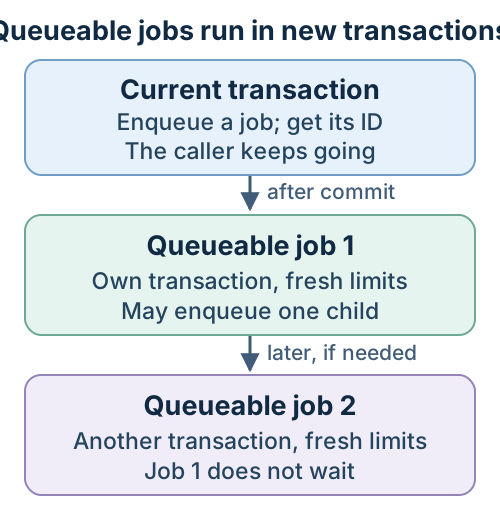
Section titled “🔗 Chaining and limits”A running Queueable can enqueue one child Queueable. Use that when the next step depends on the first, or when a large input must be split across transactions. The child gets fresh governor limits; the parent does not wait for it. Each execute() gets at most one child, so it cannot fan out into several jobs. A synchronous transaction can enqueue up to 50 Queueables; an asynchronous transaction can enqueue one. Developer Edition and Trial orgs also cap a chain at five jobs including the first, while production has no default chain-depth limit.
The transaction boundary matters more than the queue itself: enqueueing returns a job ID now, while each execute() runs later with its own limits.
To set your own cap, pass AsyncOptions when you enqueue the first job. Given a List<Id> claimIds, this example allows at most five jobs in that chain, including the first:
AsyncOptions options = new AsyncOptions();options.MaximumQueueableStackDepth = 5;Id jobId = System.enqueueJob(new ClaimReimbursementJob(claimIds), options);This enqueue pattern is optional and separate from the reimbursement exercise below. If you do configure a maximum stack depth, make sure you’ve planned what happens to records still waiting when the chain hits that ceiling—whether that means logging an alert for admin review or letting a nightly batch sweep them up. Salesforce’s AsyncOptions reference lists the available options.
Inside execute(), the child enqueue is one call after the job has separated the work it can handle from the remainder. This excerpt comes from the complete reimbursement job below:
if (!remainder.isEmpty()) { System.enqueueJob(new ClaimReimbursementJob(remainder));}If the job needs an HTTP callout, add Database.AllowsCallouts alongside Queueable on its class declaration. This is the class shape; save the complete implementation in the exercise below:
public with sharing class ClaimReimbursementJob implements Queueable, Database.AllowsCallouts { public void execute(QueueableContext context) { // Make the HTTP callout here. }}The interface permits callouts from the job; the user still needs access to the Named Credential’s External Credential principal. Keep each job small enough for its callout, CPU, and cumulative callout-time limits. The Expense Claim exercise puts these choices together.
🩹 Transaction Finalizers
Section titled “🩹 Transaction Finalizers”A Transaction Finalizer is attached inside a Queueable’s execute() method. In the reimbursement job, the attachment is one line:
System.attachFinalizer(new RetryFinalizer(claimIds));RetryFinalizer implements Finalizer; its execute(FinalizerContext context) method runs in a separate transaction after the parent job finishes. It can inspect the result and exception, record an outcome, or enqueue a safe retry after a temporary failure. It cannot undo an external operation that already happened, so retrying a callout needs an idempotency contract with the external service. The full implementation shows how the job limits retries to temporary failures.
🤔 Queueable vs. @future — When to Choose Which
Section titled “🤔 Queueable vs. @future — When to Choose Which”| Consideration | @future |
Queueable |
|---|---|---|
| Pass complex objects / sObjects | No | Yes |
| Chain another job of the same type | No | Yes |
| Get a job ID for monitoring | No | Yes |
| Maximum from a synchronous transaction | 50 | 50 |
| Maximum from a future or Batch transaction | 0 | 1 Queueable |
| Maximum from a Queueable transaction | 50, but avoid fan-out | 1 child Queueable |
| Simplest possible syntax | Yes | Slightly more setup |
Rule of thumb: Use Queueable for new single-unit async work. Keep @future mainly for existing code or a narrow platform requirement where Queueable is not suitable.
For a complete reference on the Queueable interface, chaining rules, and advanced usage, see the official Queueable Apex developer guide:
📦 Batch Apex
Section titled “📦 Batch Apex”When you need to process thousands or even millions of records, @future won’t scale and while Queueable could technically handle it through chaining, you’d have to manually split the work and enqueue each step yourself. Batch Apex solves this natively. You give it a query, and the platform automatically breaks the results into chunks, with each chunk running in its own transaction and getting a fresh set of governor limits. A Batch QueryLocator can cover up to 50 million rows. Standard Salesforce Object Query Language (SOQL) queries inside @future or Queueable remain subject to the 50,000-row query limit in each transaction; a Queueable chain can work across a larger result set by walking an Apex cursor over multiple transactions.
To run Batch Apex, you implement the Database.Batchable<sObject> interface, which requires three methods:
-
start()— Return aDatabase.QueryLocator(orIterable) that defines the full dataset to process. This is where Batch gets its superpower: aQueryLocatorcan retrieve up to 50 million rows. -
execute()— Called once per chunk, receiving aList<sObject>of records (default 200 per chunk, configurable up to 2,000). Each invocation runs in its own transaction with a fresh set of governor limits. -
finish()— Called once after all chunks have been processed. Use it for post-processing tasks like sending a summary email, logging results, or chaining to another batch or Queueable job.
The example below marks Accounts inactive when nobody has logged activity against them for a year:
start()selects active Accounts with no activity in the last 365 days, including Accounts over a year old that have never had any.execute()setsActive__ctoNoand adds a dated note to the end ofDescription, keeping anything already there. It saves withDatabase.update(scope, false), so one failed record does not stop the rest, then logs every record that failed.finish()reads the job’sAsyncApexJobrecord and logs how many chunks ran and how many failed.
public class InactiveAccountCleanupBatch implements Database.Batchable<sObject> {
    // 1. START — define the dataset    public Database.QueryLocator start(Database.BatchableContext bc) {        // A null LastActivityDate never matches a date comparison, so include        // never-active Accounts older than a year explicitly.        return Database.getQueryLocator([            SELECT Id, Name, Description, LastActivityDate            FROM Account            WHERE Active__c = 'Yes'              AND (LastActivityDate < LAST_N_DAYS:365                   OR (LastActivityDate = null AND CreatedDate < LAST_N_DAYS:365))        ]);    }
    // 2. EXECUTE — process each chunk (default 200 records)    public void execute(Database.BatchableContext bc, List<Account> scope) {        String note = 'Marked inactive by cleanup batch on ' + Date.today();        for (Account acc : scope) {            acc.Active__c = 'No';            // Append rather than overwrite, so existing notes survive.            acc.Description = String.isBlank(acc.Description)                ? note                : acc.Description + '\n' + note;        }
        // Partial success returns one SaveResult per record. Inspect every result,        // because record-level failures do not throw when allOrNone is false.        Database.SaveResult[] results = Database.update(scope, false);        for (Integer i = 0; i < results.size(); i++) {            if (results[i].isSuccess()) {                continue;            }            for (Database.Error err : results[i].getErrors()) {                System.debug(LoggingLevel.ERROR,                    'Account ' + scope[i].Id + ' failed: ' + err.getMessage());            }        }    }
    // 3. FINISH — post-processing    public void finish(Database.BatchableContext bc) {        // Query the job to get summary info        AsyncApexJob job = [            SELECT TotalJobItems, JobItemsProcessed, NumberOfErrors            FROM AsyncApexJob            WHERE Id = :bc.getJobId()        ];
        System.debug('Batch complete. Processed: ' + job.JobItemsProcessed            + ' chunks, Failed chunks: ' + job.NumberOfErrors);
        // Optionally chain to another batch or send a notification    }}
Active__c is the sample Yes/No picklist in the Developer Edition used for this guide. If your practice org does not have it, create the field with Yes and No values or substitute a field that fits your own cleanup rule.
🏃 Running a Batch
Section titled “🏃 Running a Batch”Execute a batch with Database.executeBatch. The optional second parameter controls the chunk size:
// Default chunk size (200 records per execute() call)Id batchId = Database.executeBatch(new InactiveAccountCleanupBatch());
// Custom chunk size — smaller chunks if each record does heavy processingId batchId = Database.executeBatch(new InactiveAccountCleanupBatch(), 50);
To make HTTP callouts from a batch, implement Database.AllowsCallouts alongside Database.Batchable on the class. Make the callouts inside execute(), where each chunk runs in its own transaction. The reimbursement sweep later in this chapter shows the declaration and callout together in a complete class.
Smaller chunk sizes (e.g., 50 or 100) give you more headroom per chunk when each record triggers callouts, complex calculations, or downstream data manipulation language (DML) operations. Larger sizes (200–2,000) can reduce the number of transactions for simple field updates. For callout work, size each chunk against its callout count, cumulative callout time, CPU, and heap usage. If each record makes one callout, the 100-callout limit caps the scope at 100, and slow responses may require a smaller scope.
📏 Batch Limits
Section titled “📏 Batch Limits”There are a few important limits to keep in mind when working with Batch Apex:
- 5 active batches: Up to five Batch Apex jobs can be active at once. As many as 100 additional jobs can wait in the Apex flex queue with a
Holdingstatus. - The 50-million-row allowance applies to the
QueryLocatorquery: returning aDatabase.QueryLocatorbypasses the query-row limit for that specific result set. Any other SOQL queries you run insidestart(), or any list built for anIterable, still operate under standard per-transaction governor limits. - Stateless by default: Member variables reset between each
execute()call. If you need to maintain state across chunks (e.g., a running error count), implementDatabase.Stateful, which is covered below.
💾 Maintaining State Across Chunks
Section titled “💾 Maintaining State Across Chunks”Batch Apex is stateless by default: instance fields reset before each execute() chunk. If finish() needs a total from all completed chunks, add Database.Stateful and keep an instance counter, for example public Integer processedCount = 0;. Salesforce serialises that state between chunks. Keep it small; carrying a growing list of records adds serialisation cost and can exhaust heap. Failed chunks do not add their attempted work to the counter, so inspect AsyncApexJob.NumberOfErrors alongside any summary.
The reimbursement retry batch shows the complete pattern: Database.Stateful on the class, two counters incremented in execute(), and their totals read in finish(). Follow paidCount across those three places; without Database.Stateful, finish() would see its initial zero.
For full details on the Database.Batchable interface, stateful batches, and advanced patterns, see the official Batch Apex developer guide:
⏰ Scheduled Apex
Section titled “⏰ Scheduled Apex”Scheduled Apex lets you run code automatically at a specific time or on a recurring schedule, such as every night at 2 AM or on the first day of each month. If you’ve used scheduled tasks in Windows or cron jobs in Linux, it’s the same concept.
To set this up, you implement the Schedulable interface and define an execute method that contains the logic you want to run on schedule. The example below is the scheduler this chapter uses:
execute()runs each time the schedule fires. Here it startsInactiveAccountCleanupBatchfrom the Batch Apex section, in chunks of 200.- It does no record work of its own. Scheduled Apex runs with synchronous governor limits, so the class hands the work to a batch, where each chunk gets its own limits.
- The class says what runs, not when. You set the time separately, as the next section shows.
- The reimbursement exercise later adds its nightly retry sweep to this same
execute()method.
public class NightlyCleanupScheduler implements Schedulable {
    public void execute(SchedulableContext sc) {        // Scheduled Apex has synchronous limits, so it launches the batch.        Database.executeBatch(new InactiveAccountCleanupBatch(), 200);    }}
📅 Scheduling a Job
Section titled “📅 Scheduling a Job”You can schedule a job in two ways: programmatically using System.schedule with a cron expression, or through the UI in Setup → Apex Classes by clicking the Schedule Apex button.
Here’s the programmatic approach, which gives you full control over the schedule:
// Run every night at 2:00 AMString cronExpression = '0 0 2 * * ?';String jobId = System.schedule('Nightly Async Maintenance', cronExpression, new NightlyCleanupScheduler());The cron expression is interpreted in the scheduling user’s time zone. Record the owning user and expected daylight-saving behaviour so a later admin understands when “2:00 AM” really runs.
For a batch that only needs to run once, later, you don’t need a scheduler class at all. System.scheduleBatch runs a batch job once, a given number of minutes from now:
// Run the cleanup batch once, 60 minutes from now, in chunks of 200String jobId = System.scheduleBatch(new InactiveAccountCleanupBatch(), 'One-off account cleanup', 60, 200);It takes no cron expression, so a recurring schedule like this chapter’s nightly run still needs a Schedulable class.
🕒 Cron Expression Reference
Section titled “🕒 Cron Expression Reference”A cron expression is a string that defines when a scheduled job should run. Salesforce cron expressions have seven fields, separated by spaces, read left to right:
Seconds Minutes Hours Day-of-Month Month Day-of-Week Year(optional) 0 0 2 * * ?This example reads: at 0 seconds, 0 minutes, hour 2 (2 AM), on every day of the month, in every month, on any day of the week.
Here’s what each field accepts:
| Field | Position | Values | Example |
|---|---|---|---|
| Seconds | 1st | 0–59 | 0 |
| Minutes | 2nd | 0–59 | 0 |
| Hours | 3rd | 0–23 | 2 (2 AM) |
| Day of Month | 4th | 1–31, ?, L, W |
* (every day) |
| Month | 5th | 1–12 or JAN–DEC |
* (every month) |
| Day of Week | 6th | 1–7 or SUN–SAT, ?, L, # |
? (any day) |
| Year (optional) | 7th | 1970–2099 | — |
You’ll notice ? used for Day of Week when Day of Month is set (or vice versa). This means “no specific value” and is required by Salesforce because you can’t specify both Day of Month and Day of Week at the same time.
Here are some common patterns:
// Every weekday at 6:30 AM'0 30 6 ? * MON-FRI'
// First day of every month at midnight'0 0 0 1 * ?'
// Every hour on the hour'0 0 * * * ?'
🔧 Managing Scheduled Jobs
Section titled “🔧 Managing Scheduled Jobs”Once a job is scheduled, you’ll want to check on it or cancel it if something changes. You can do this through the UI by navigating to Setup → Scheduled Jobs, which shows a list of all scheduled jobs with their next run time, status, and the user who created them.
That creating user matters operationally: if their account is later deactivated, the job can start failing or behaving unexpectedly. Org Health & Monitoring walks through a real case of exactly that, and how to keep job ownership off your offboarding blind spot.
You can also manage them programmatically. Scheduled jobs are stored in the CronTrigger object, and you can query it to see what’s currently scheduled:
// List all scheduled Apex jobs (JobType '7' = scheduled Apex)List<CronTrigger> jobs = [    SELECT Id, CronJobDetail.Name, State, NextFireTime    FROM CronTrigger    WHERE CronJobDetail.JobType = '7'];
// Abort a scheduled job by its IDSystem.abortJob(jobId);
🚧 Scheduled Apex Limits
Section titled “🚧 Scheduled Apex Limits”There are a couple of important limits to be aware of:
- 100 job cap: You can have a maximum of 100 scheduled Apex jobs at any time in an org.
- Standard governor limits: Unlike
@futureand Queueable, scheduled jobs don’t get elevated governor limits. They run with the same synchronous limits as regular Apex. This is why most Scheduled Apex classes are lightweight: they simply launch a Batch or Queueable job that does the heavy lifting with elevated limits.
For the full reference on the Schedulable interface, cron syntax, and scheduling limits, see the official Scheduled Apex developer guide:
🧭 Future vs Queueable vs Batch vs Scheduled: Which to Use
Section titled “🧭 Future vs Queueable vs Batch vs Scheduled: Which to Use”With four options available, how do you decide which one to use? Here’s a decision flow:
-
Do you need to run at a specific time? → Use Scheduled Apex (which typically launches a Batch or Queueable inside its
executemethod). -
Are you processing more than 50,000 records? → Use Batch Apex, or a chain of Queueable jobs walking an Apex cursor. The comparison below shows which fits.
-
Do you need to chain jobs, pass complex objects, or monitor progress? → Use Queueable Apex.
-
Is it existing, simple fire-and-forget code that only needs primitive arguments? → It’s fine to leave
@futurein place; for any new development, use Queueable.
🆚 Batch Apex vs a Queueable chain with an Apex cursor
Section titled “🆚 Batch Apex vs a Queueable chain with an Apex cursor”Both can work through up to 50 million rows, so the choice for a large dataset comes down to who manages the chunks. Batch manages them for you. A cursor hands that control to your code, which is extra work but avoids the org’s shared Batch capacity. Apex cursors became generally available in Spring ’26 and require API version 66.0 or later.
| Batch Apex | Queueable chain + Apex cursor | |
|---|---|---|
| Who splits the work | The platform, at a fixed scope size | Your code, which can change the fetch size per run |
| Batch slots and flex queue | Counts toward the five active jobs, then waits in the flex queue | Uses neither |
| When a run fails | Only that chunk fails | Only that Queueable fails; a Finalizer decides what happens next |
| Carrying totals between runs | Database.Stateful |
Pass them to the next job’s constructor |
| What you manage | The query and the per-chunk logic | The chain, plus Queueable, cursor fetch, and query row limits |
Batch is still the simpler default for a scheduled sweep over one query: the platform handles chunking, and a failed chunk doesn’t stop the rest. A cursor chain earns its extra code when busy Batch slots and a full flex queue are delaying important work, or when the right chunk size depends on the records being processed.
🧩 Combining the patterns in a real org
Section titled “🧩 Combining the patterns in a real org”In practice, most production orgs use a combination:
- A Scheduled job runs nightly and kicks off a Batch to process large datasets.
- A trigger handler enqueues a Queueable to make a callout or perform a complex multi-step operation.
- Existing
@futuremethods are often used to avoid Mixed DML by moving one operation into a separate transaction. For new work, prefer a Queueable-based design where the surrounding automation supports it.
Wrap the enqueue or schedule call in Test.startTest() and Test.stopTest(). At Test.stopTest(), Salesforce runs the collected async work so you can assert its result. Test each Queueable’s behaviour directly rather than relying on one test to execute an entire chain, and keep a separate test for the decision to enqueue the child. We’ll cover this in detail in Part 7, Testing & Deployment.
If you want hands-on practice with all four async patterns, the Asynchronous Apex Trailhead module walks you through each one with interactive challenges:
🧱 Apply the patterns: reimburse an Expense Claim
Section titled “🧱 Apply the patterns: reimburse an Expense Claim”Now that you know what each mechanism does, combine three of them for one approval. The Queueable handles the callout, its Finalizer retries temporary failures, and a Batch that Scheduled Apex runs nightly checks claims that never reached a final state. We’re leaving @future aside here: as we established earlier, Queueable provides the chaining, monitoring, and callout capabilities this workflow requires.
The example uses a fictional Payment_API contract. For this exercise, HTTP 201 with a non-blank paymentReference means the reimbursement has completed, and repeating a request with the same clientReference returns that same payment rather than creating another. HTTP does not define that meaning: 201 Created only says something was created, so a real payment API could return it for a payment that has not settled yet.
Add three pieces to Expense_Claim__c in Object Manager before saving the code:
PaidandPayment Reviewvalues onStatus__c. The first records a confirmed reimbursement; the second takes a permanent rejection out of the automatic retry path.Reimbursement_Reference__c, Text(255). This stores the confirmed payment reference. A claim stillApprovedwith no reference is eligible for a retry.Reimbursement_Error__c, Text(255). This gives support a durable reason to inspect a claim inPayment Review.
For the user whose approval enqueues the Queueable, grant object Read, record access, and field Read access to Name, Amount__c, Status__c, and Reimbursement_Reference__c; the job’s WITH USER_MODE query uses all four. The scheduling user needs equivalent read access. This exercise does not create the Payment_API Named Credential, and the tests do not need it. Every real callout fails until it exists, whether it comes from a claim approved in your org, a manual batch run, or the scheduled sweep. A user who starts a live callout also needs access to its External Credential principal; Part 6 shows how to set up both.
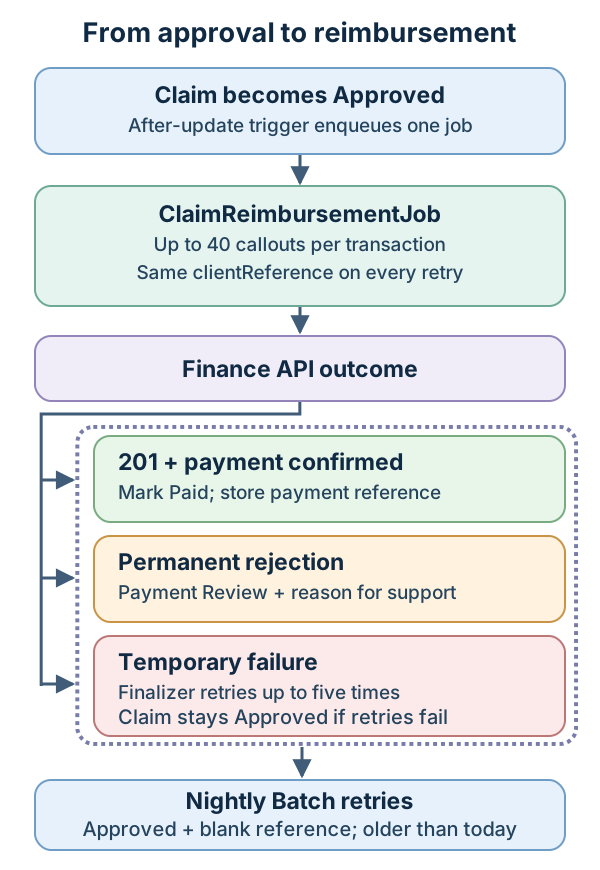
The diagram below follows a claim from approval to one of three outcomes. The Queueable handles at most 40 claims per transaction, then chains another job for the remainder. Each request has a 2.5-second timeout, bounding 40 callouts to roughly 100 seconds of wait time under the 120-second cumulative limit. Forty claims per job also lets a full 200-record trigger invocation fit the five-job chain limit in Developer Edition. These numbers fit the mock; a real payment API would set its own rate limits and response times, and you would size the claims per job and the timeout to match them. The nightly batch only checks claims still Approved with no reference and last modified before today, so a claim approved this morning is not swept on the same night.
Save the client and Queueable classes before adding the trigger path. The batch comes after the trigger tests. The tests use a callout mock, so you can verify the flow without making a payment.
📤 Submit one reimbursement request
Section titled “📤 Submit one reimbursement request”PaymentApiClient sends one claim to the finance system and turns the answer into a result its callers can act on:
- The payment reference when a
201includes one. - A
RetryablePaymentExceptionfor a temporary408,429, or5xxerror. - A
PaymentApiExceptionfor anything else.
The Queueable and the batch both call it, so they handle every response the same way. Each attempt sends the claim’s record ID as clientReference, so a retry for the same claim always carries the same key:
public with sharing class PaymentApiClient {
    public class RetryablePaymentException extends Exception {}    public class PaymentApiException extends Exception {}
    // The sample API promises that 201 means payment completed, not merely accepted.    // Permanent errors require review; temporary errors may be retried safely only    // because the provider honours clientReference as an idempotency key.    public static String submit(Expense_Claim__c claim) {        HttpRequest req = new HttpRequest();        req.setEndpoint('callout:Payment_API/v1/reimbursements');        req.setMethod('POST');        req.setHeader('Content-Type', 'application/json');        req.setTimeout(2500);        // The record ID is the idempotency key: unique by construction and the same on every        // retry. If the finance system has already paid it, it must answer with the same        // reference, not pay it twice. The claim number is for the people on their side.        req.setBody(JSON.serialize(new Map<String, Object>{            'clientReference' => claim.Id,            'claimNumber' => claim.Name,            'amount' => claim.Amount__c        }));
        HttpResponse res = new Http().send(req);        Integer status = res.getStatusCode();        if (status == 408 || status == 429 || status >= 500) {            throw new RetryablePaymentException(                'Temporary payment API error HTTP ' + status            );        }        if (status != 201) {            throw new PaymentApiException(                'Payment API requires review: HTTP ' + status            );        }        try {            Map<String, Object> body = (Map<String, Object>) JSON.deserializeUntyped(res.getBody());            String reference = (String) body.get('paymentReference');            if (String.isBlank(reference)) {                throw new PaymentApiException('Payment API returned no payment reference');            }            return reference;        } catch (PaymentApiException ex) {            throw ex;        } catch (Exception ex) {            throw new PaymentApiException('Payment API returned an invalid confirmation');        }    }}
🧾 Process approved claims
Section titled “🧾 Process approved claims”ClaimReimbursementJob is the Queueable the trigger enqueues with the IDs of newly approved claims. Each run:
- Attaches a
RetryFinalizerbefore doing any work, so a failed run can be retried. - Takes the first 40 IDs (
CLAIMS_PER_JOB) for this run and keeps the rest for a child job. - Re-queries those claims, keeping only the ones still
Approvedwith no payment reference. - Calls
PaymentApiClient.submit()for each claim. A payment reference marks the claimPaid; aPaymentApiExceptionmoves it toPayment Reviewwith the error message. - Saves all the claim changes in one update.
- Enqueues one child job for the remaining IDs, if there are any.
A temporary error is not caught here. It fails the whole run, which rolls back that run’s claim changes, and the Finalizer enqueues the same claims again:
public with sharing class ClaimReimbursementJob implements Queueable, Database.AllowsCallouts {
    // Leave room for slow callouts as well as the platform's 100-callout ceiling.    private static final Integer CLAIMS_PER_JOB = 40;
    private final List<Id> claimIds;
    public ClaimReimbursementJob(List<Id> claimIds) {        this.claimIds = claimIds;    }
    public void execute(QueueableContext context) {        // If this transaction dies, the Salesforce changes below roll back. The external        // payment might still exist, so clientReference must make a resend idempotent.        System.attachFinalizer(new RetryFinalizer(claimIds));
        List<Id> thisRun = new List<Id>();        List<Id> remainder = new List<Id>();        for (Integer i = 0; i < claimIds.size(); i++) {            if (i < CLAIMS_PER_JOB) {                thisRun.add(claimIds[i]);            } else {                remainder.add(claimIds[i]);            }        }
        List<Expense_Claim__c> unpaid = [            SELECT Id, Name, Amount__c            FROM Expense_Claim__c            WHERE Id IN :thisRun              AND Status__c = 'Approved'              AND Reimbursement_Reference__c = null            WITH USER_MODE        ];
        List<Expense_Claim__c> changes = new List<Expense_Claim__c>();        for (Expense_Claim__c claim : unpaid) {            try {                String reference = PaymentApiClient.submit(claim);                claim.Reimbursement_Reference__c = reference;                claim.Status__c = 'Paid';                claim.Reimbursement_Error__c = null;            } catch (PaymentApiClient.PaymentApiException ex) {                claim.Status__c = 'Payment Review';                claim.Reimbursement_Error__c = ex.getMessage();            }            changes.add(claim);        }
        // Integration-owned status and reference fields are written in system mode.        if (!changes.isEmpty()) {            update as system changes;        }
        if (!remainder.isEmpty()) {            System.enqueueJob(new ClaimReimbursementJob(remainder));        }    }
    public class RetryFinalizer implements Finalizer {
        private final List<Id> claimIds;
        public RetryFinalizer(List<Id> claimIds) {            this.claimIds = claimIds;        }
        public void execute(FinalizerContext ctx) {            // Only retry transient network issues (timeouts or 5xx server errors).            // Code faults (such as null pointers) won't resolve on retry and should stay Failed for triage.            Exception failure = ctx.getException();            if (ctx.getResult() == ParentJobResult.SUCCESS                    || (!(failure instanceof CalloutException)                        && !(failure instanceof PaymentApiClient.RetryablePaymentException))) {                return;            }            // Salesforce record changes rolled back, but the payment API may have accepted            // an earlier request. The clientReference contract makes the resend safe.            System.enqueueJob(new ClaimReimbursementJob(claimIds));        }    }}
There are a few important details in this example:
QueueableplusDatabase.AllowsCallouts. The interface gives youexecute(QueueableContext context), where the work lives, and a constructor that can take anything: sObjects, custom classes, or a plainList<Id>as here. The second interface is what permits the HTTP callouts; without it the firstsend()throws.- The query does the filtering, not the trigger. By the time the job runs, a claim could have been paid by an earlier retry or reverted by an admin. Re-querying for
Approvedwith a blank reference means a stale ID list can’t cause a double payment. - User mode for the read, system mode for the write. The query runs
WITH USER_MODEso the job sees only the claims the approver could; enforcing access at query time explains how that mode differs from the older options. The update usesas systemon purpose: the reference and thePaidstatus are the job’s fields, not the approver’s, and giving every approver edit access to them would be the wrong fix. The comment in the code says so, because the next developer will wonder. - Three outcomes, three answers. The sample contract treats
201with a reference as payment completed. A422or other permanent rejection moves the claim toPayment Reviewwith a reason for support; it is not sent to the nightly retry batch. A timeout,408,429, or5xxis temporary, so the transaction fails and the Finalizer retries it. If all those retries fail, the claim staysApprovedfor the later sweep. - The idempotency key is what makes the retry safe. A retry after a timeout cannot know whether the first request landed. Sending the record ID as
clientReferencemakes the finance system responsible for answering the same way twice, and the ID is unique whatever the claim’s Name field turns out to be. Part 4 taught the same lesson for Tasks; here it has money attached.
🚚 Enqueuing from the trigger
Section titled “🚚 Enqueuing from the trigger”The Part 4 ExpenseClaimTrigger only handles before update. Replace that example with this complete two-event version:
- In
before update, it keeps the Part 4 rule: a claim that wasApprovedcannot go back toDraft. It also stops a claim that already has a payment reference from being approved again. The job and the nightly sweep only pay claims with no reference, so re-approving a paid claim, or one whose payment finance later returns, would send nothing and leave it looking approved. Give approvers Read, not Edit, onReimbursement_Reference__c, so nobody can clear the reference to get round the rule. - In
after update, it collects the IDs of claims whose status has just changed toApproved. Later edits to a claim that is alreadyApproveddo not add it again. - It enqueues one
ClaimReimbursementJobfor all the claims approved in this trigger invocation, but only when the trigger is not running inside a batch job and the transaction still has room for another Queueable.
trigger ExpenseClaimTrigger on Expense_Claim__c (before update, after update) {    if (Trigger.isBefore) {        for (Expense_Claim__c claim : Trigger.new) {            Expense_Claim__c oldClaim = Trigger.oldMap.get(claim.Id);            if (oldClaim.Status__c == 'Approved' && claim.Status__c == 'Draft') {                claim.addError('You cannot revert an Approved claim back to Draft.');            }            // The job and the sweep only pay claims with no reference, so approving            // a paid or returned claim again would send nothing.            if (claim.Status__c == 'Approved' && oldClaim.Status__c != 'Approved'                    && String.isNotBlank(oldClaim.Reimbursement_Reference__c)) {                claim.addError('This claim already has a payment reference. '                    + 'Approving it again will not send a new payment.');            }        }    }
    if (Trigger.isAfter) {        List<Id> newlyApproved = new List<Id>();        for (Expense_Claim__c claim : Trigger.new) {            Expense_Claim__c oldClaim = Trigger.oldMap.get(claim.Id);            if (claim.Status__c == 'Approved' && oldClaim.Status__c != 'Approved') {                newlyApproved.add(claim.Id);            }        }
        if (!newlyApproved.isEmpty()                && !System.isBatch()                && Limits.getQueueableJobs() < Limits.getLimitQueueableJobs()) {            Id jobId = System.enqueueJob(new ClaimReimbursementJob(newlyApproved));        }    }}
The guards come from Salesforce’s record-triggered automation guidance. A synchronous transaction can enqueue 50 jobs; an asynchronous transaction can enqueue one, so System.isBatch() skips the enqueue when another batch approves claims and leaves those claims to the nightly sweep. The Limits check prevents an exception when earlier automation has already used the allowance. The org-wide rolling 24-hour allowance is 250,000 async executions or 200 per user licence, whichever is greater, shared across all four mechanisms. A data load of 20,000 claims fires the trigger 100 times when Salesforce sends full 200-record trigger batches; one job per invocation costs 100 executions, while one job per claim would cost 20,000.
The earlier Account example showed how to inspect that returned jobId. In this trigger, you would persist it or emit it to your logging system if support needs to correlate a claim with a specific job; a local variable alone disappears when the transaction ends.
🔁 Continue the claim set
Section titled “🔁 Continue the claim set”The reimbursement job chains because each transaction has a callout budget: at most 100 callouts and 120 seconds of total callout time. With a 2.5-second timeout per request, 40 claims fit comfortably inside that budget, so each job processes 40 and passes the rest to a child job that starts with a fresh budget. A trigger invocation that approves 75 claims therefore needs two jobs. The first handles 40 and passes 35 IDs to a fresh copy of itself:
if (!remainder.isEmpty()) { System.enqueueJob(new ClaimReimbursementJob(remainder));}The child runs with its own limits and, if there is still a remainder, chains again. That’s the whole pattern: split the work at the limit, pass what’s left forward, and let each link be small enough to succeed.
The chaining limits matter here: five jobs at 40 claims each cover a full 200-record trigger invocation in Developer Edition or a Trial org. A provider that needs longer than this example’s 2.5-second per-request timeout calls for smaller groups and another dispatch design.
🧯 Retry temporary failures
Section titled “🧯 Retry temporary failures”The RetryFinalizer inner class is the part of the build that most orgs don’t have. The job attaches this Transaction Finalizer at the start of execute(), and it runs after the job finishes, in its own transaction, whether the job succeeded or died on an unhandled exception. Its execute() method:
- Returns straight away if
FinalizerContext.getResult()reports success. - Uses
getException()to see why the job failed. Anything other than aCalloutException(a timeout, for example) or the client’sRetryablePaymentExceptionis a code fault, so it returns and leaves the jobFailedin Apex Jobs for someone to read. Retrying a code fault five times only delays that moment. - Otherwise enqueues a new
ClaimReimbursementJobwith the same claim IDs.
Salesforce rolls back the claim updates from the failed transaction, but it cannot roll back a payment that the external system already accepted. The retry is safe only because the finance system treats clientReference as an idempotency key and returns the original payment reference instead of paying the claim again. Salesforce caps a finalizer at five consecutive re-enqueues of a failing job, after which the claims wait, still Approved with a blank reference, for the nightly batch below.
That is the escalation path: near-real-time payment when everything works, five automatic retries when the finance system is briefly down, and a sweep the next morning for anything that outlasted them. Support can find the stragglers with one filter: Approved and no reference.
🧪 Test the outcome and the trigger path
Section titled “🧪 Test the outcome and the trigger path”A mock stands in for the finance system, so the tests need no Named Credential or external payment service. The class has one mock, one helper, and four tests:
PaymentApiMockchecks what the code sends (endpoint, method,clientReference, and amount), then returns the status code and body that each test gives it. It sits inside the test class to keep the example in one listing. In a real project, save it as its own public@IsTestclass, as Salesforce’s callout testing example does, so other test classes, such as tests for the retry batch, can reuse it.submittedClaim()inserts a claim with an amount of 250 and a status ofSubmitted, ready to be approved.approvalQueuesPaymentAndStoresConfirmationapproves the claim, so the real trigger enqueues the job, andTest.stopTest()runs it. With a201and a payment reference, the claim endsPaidwith the reference stored and no error.permanentRejectionLeavesAReviewableClaimfollows the same path with a422. The claim moves toPayment Reviewwith the error message and no reference.temporaryResponseIsRetryablecalls the client directly with a503and checks that it throwsRetryablePaymentException. It uses an unsaved claim because a callout cannot follow uncommitted DML in the same transaction.claimWithPaymentReferenceCannotBeApprovedAgaininserts aPaidclaim with a reference, tries to approve it, and checks that the trigger rejects the update and leaves the claimPaid. No callout happens, so it needs no mock.
@IsTestprivate class ClaimReimbursementJobTest {
    private class PaymentApiMock implements HttpCalloutMock {        private Id expectedClaimId;        private Integer responseCode;        private String responseBody;
        PaymentApiMock(Id expectedClaimId, Integer responseCode, String responseBody) {            this.expectedClaimId = expectedClaimId;            this.responseCode = responseCode;            this.responseBody = responseBody;        }
        public HttpResponse respond(HttpRequest req) {            Assert.areEqual('callout:Payment_API/v1/reimbursements', req.getEndpoint());            Assert.areEqual('POST', req.getMethod());            Map<String, Object> body =                (Map<String, Object>) JSON.deserializeUntyped(req.getBody());            if (expectedClaimId != null) {                Assert.areEqual(String.valueOf(expectedClaimId), body.get('clientReference'));            }            Assert.areEqual(Decimal.valueOf('250'),                Decimal.valueOf(String.valueOf(body.get('amount'))));
            HttpResponse res = new HttpResponse();            res.setStatusCode(responseCode);            res.setBody(responseBody);            return res;        }    }
    private static Expense_Claim__c submittedClaim() {        Expense_Claim__c claim = new Expense_Claim__c(            Amount__c = 250,            Status__c = 'Submitted'        );        insert claim;        return claim;    }
    @IsTest    static void approvalQueuesPaymentAndStoresConfirmation() {        Expense_Claim__c claim = submittedClaim();        Test.setMock(HttpCalloutMock.class,            new PaymentApiMock(claim.Id, 201, '{"paymentReference":"PAY-0001"}'));
        Test.startTest();        claim.Status__c = 'Approved';        update claim;        Test.stopTest();
        claim = [            SELECT Status__c, Reimbursement_Reference__c, Reimbursement_Error__c            FROM Expense_Claim__c WHERE Id = :claim.Id        ];        Assert.areEqual('Paid', claim.Status__c);        Assert.areEqual('PAY-0001', claim.Reimbursement_Reference__c);        Assert.areEqual(null, claim.Reimbursement_Error__c);    }
    @IsTest    static void permanentRejectionLeavesAReviewableClaim() {        Expense_Claim__c claim = submittedClaim();        Test.setMock(HttpCalloutMock.class,            new PaymentApiMock(claim.Id, 422, '{"reason":"Declined"}'));
        Test.startTest();        claim.Status__c = 'Approved';        update claim;        Test.stopTest();
        claim = [            SELECT Status__c, Reimbursement_Reference__c, Reimbursement_Error__c            FROM Expense_Claim__c WHERE Id = :claim.Id        ];        Assert.areEqual('Payment Review', claim.Status__c);        Assert.areEqual(null, claim.Reimbursement_Reference__c);        Assert.areEqual('Payment API requires review: HTTP 422',            claim.Reimbursement_Error__c);    }
    @IsTest    static void temporaryResponseIsRetryable() {        // The client-only test needs no DML before its callout.        Expense_Claim__c claim = new Expense_Claim__c(Amount__c = 250);        Test.setMock(HttpCalloutMock.class,            new PaymentApiMock(null, 503, '{"reason":"Unavailable"}'));
        Boolean retryable = false;        try {            PaymentApiClient.submit(claim);        } catch (PaymentApiClient.RetryablePaymentException ex) {            retryable = true;        }        Assert.isTrue(retryable, 'A temporary API response must be retryable');    }
    @IsTest    static void claimWithPaymentReferenceCannotBeApprovedAgain() {        Expense_Claim__c claim = new Expense_Claim__c(            Amount__c = 250,            Status__c = 'Paid',            Reimbursement_Reference__c = 'PAY-0001'        );        insert claim;
        claim.Status__c = 'Approved';        Database.SaveResult result = Database.update(claim, false);
        Assert.isFalse(result.isSuccess());        Assert.isTrue(result.getErrors()[0].getMessage().contains('payment reference'));        claim = [SELECT Status__c FROM Expense_Claim__c WHERE Id = :claim.Id];        Assert.areEqual('Paid', claim.Status__c);    }}
The third test checks the client-side decision to retry. Test the Finalizer’s retry decision separately from the approval path; Apex tests should not rely on an entire async chain running inside one Test.stopTest(). The mock can assert that clientReference is present, but cannot prove the provider honours it as an idempotency key.
📡 Recover unfinished claims with Batch
Section titled “📡 Recover unfinished claims with Batch”ClaimReimbursementRetryBatch is the nightly safety net for claims that stayed Approved after the Queueable path failed or was skipped. Database.AllowsCallouts lets it make the payment callouts, and its three batch methods split the work:
start()selects the claims stillApprovedwith no payment reference and last modified before today.execute()receives those claims one chunk at a time and callsPaymentApiClient.submit()for each. As in the Queueable, a payment reference marks the claimPaidand aPaymentApiExceptionmoves it toPayment Review. It saves each chunk’s changes in one update and adds to thepaidCountandreviewCounttotals.finish()runs once at the end and writes both totals, plus the number of failed chunks, to the debug log.
The query leaves out claims in Payment Review: repeating a permanent rejection every night would hide the decision support needs to make. LastModifiedDate < TODAY gives a newly approved claim time to finish its Queueable path first. The trigger skips enqueueing when a claim is approved inside another batch job or when the transaction has no Queueable slot left; this sweep picks those claims up on a later night.
public with sharing class ClaimReimbursementRetryBatch    implements Database.Batchable<sObject>, Database.AllowsCallouts, Database.Stateful {
    public Integer paidCount = 0;    public Integer reviewCount = 0;
    public Database.QueryLocator start(Database.BatchableContext bc) {        return Database.getQueryLocator(            'SELECT Id, Name, Amount__c FROM Expense_Claim__c '            + 'WHERE Status__c = \'Approved\' AND Reimbursement_Reference__c = null '            + 'AND LastModifiedDate < TODAY',            AccessLevel.USER_MODE        );    }
    public void execute(Database.BatchableContext bc, List<Expense_Claim__c> scope) {        List<Expense_Claim__c> changes = new List<Expense_Claim__c>();        for (Expense_Claim__c claim : scope) {            try {                claim.Reimbursement_Reference__c = PaymentApiClient.submit(claim);                claim.Status__c = 'Paid';                claim.Reimbursement_Error__c = null;                paidCount++;            } catch (PaymentApiClient.PaymentApiException ex) {                claim.Status__c = 'Payment Review';                claim.Reimbursement_Error__c = ex.getMessage();                reviewCount++;            }            changes.add(claim);        }        if (!changes.isEmpty()) {            update as system changes;        }    }
    public void finish(Database.BatchableContext bc) {        AsyncApexJob job = [            SELECT NumberOfErrors FROM AsyncApexJob WHERE Id = :bc.getJobId()        ];        System.debug('Retry sweep confirmed: ' + paidCount            + '; review: ' + reviewCount            + '; failed chunks: ' + job.NumberOfErrors);        // Send these counts to a support-owned monitor in a real deployment.    }}
Run the batch with a scope of 40, matching the Queueable’s callout budget: Database.executeBatch(new ClaimReimbursementRetryBatch(), 40);. A retryable callout error fails its current chunk, which remains Approved for a later sweep; earlier successful chunks keep their results. Database.Stateful carries the two counts across successful chunks, while AsyncApexJob.NumberOfErrors shows failed chunks. The query runs in user mode as the scheduling user, and the integration-owned update runs in system mode. In a production org, set up a report for claims sitting in Payment Review so support can triage them, and configure alerts when NumberOfErrors > 0 so failed chunks are flagged promptly. Also watch for claims that stay Approved with no payment reference through two nightly sweeps. The sweep skips claims modified that day, so by then both the Queueable and a retry have failed to pay them.
To run the sweep every night, add it to NightlyCleanupScheduler from the Scheduled Apex section, so one scheduled job starts both batches:
public class NightlyCleanupScheduler implements Schedulable {
    public void execute(SchedulableContext sc) {        // Scheduled Apex has synchronous limits, so it launches the batches.        Database.executeBatch(new InactiveAccountCleanupBatch(), 200);        // Retry claims the Queueable path left unfinished, 40 per chunk to        // match the Queueable's callout budget.        Database.executeBatch(new ClaimReimbursementRetryBatch(), 40);    }}
If you already scheduled the class, Salesforce will not save changes to it while its job is pending. Delete the job in Setup → Scheduled Jobs, save the class, then schedule it again with the same System.schedule call. The scheduling user needs the same read and External Credential principal access described above.
For the Developer Journey’s Stage 3 evidence, keep the mock test results and a short explanation of why the trigger enqueues a Queueable and which claims the nightly batch retries. The developer capstone later changes this build so support can reissue a returned payment under a new key.
🔍 Monitoring and Debugging Async Jobs
Section titled “🔍 Monitoring and Debugging Async Jobs”Async jobs don’t give you immediate feedback like synchronous code. When a trigger runs, you see the result right away: the record saves, or you get an error. But when you enqueue a Queueable or kick off a Batch, the code runs in the background and you won’t know whether it succeeded or failed unless you actively check. This makes monitoring and debugging async jobs an essential skill. Here’s how to keep track of them.
📊 The AsyncApexJob Object
Section titled “📊 The AsyncApexJob Object”All async Apex jobs (Batch, Queueable, Future, Scheduled) are tracked in the AsyncApexJob object. You can query it to see what’s running, what completed, and what failed:
List<AsyncApexJob> recentJobs = [ SELECT Id, ApexClass.Name, Status, JobType, NumberOfErrors, JobItemsProcessed, TotalJobItems, CreatedDate, CompletedDate FROM AsyncApexJob WHERE CreatedDate = TODAY ORDER BY CreatedDate DESC LIMIT 20];The Status field tells you where the job is in its lifecycle: Holding, Queued, Preparing, Processing, Completed, Failed, or Aborted.
🔩 Apex Jobs in Setup
Section titled “🔩 Apex Jobs in Setup”Navigate to Setup → Apex Jobs to see a real-time view of all async job activity. This is often the first place to check when something isn’t working as expected.
🪵 Debug Logs for Async
Section titled “🪵 Debug Logs for Async”Async Apex logs are usually associated with the user who submitted, enqueued, or scheduled the work. Check the Submitted By user in Apex Jobs or Scheduled Jobs, then create a trace flag for that user. This logging identity is separate from the user or system access mode chosen for each database operation. Some platform-managed asynchronous work uses a special user such as Automated Process or Platform Integration, which must be traced instead.
An unhandled exception marks the job Failed, giving you a clear signal to investigate. A job can show Completed when code catches a failure, so that status alone does not prove every business step succeeded. Monitor Apex Jobs or AsyncApexJob, and add durable logging or alerts for production-critical work. Catch exceptions when you can add context, retry safely, or record a controlled business outcome; make any remaining failure visible to support. Queueable Finalizers can inspect the final result and centralise recovery or notification.
🎯 Final Thoughts
Section titled “🎯 Final Thoughts”You now have four tools for moving work off the synchronous path:
@futurefor older, simple fire-and-forget code you still need to maintain.- Queueable as the default for new jobs that need callouts, object parameters, chaining, or monitoring.
- Batch for processing massive datasets in governor-limit-safe chunks.
- Scheduled for time-based execution that typically launches Batch or Queueable work.
The reimbursement exercise uses a Queueable because the trigger cannot make the callout, a Finalizer for temporary failures, and a Batch for eligible claims left behind. Its most important boundary is the external contract: a response code alone cannot prove money moved, and a retry is safe only when the provider honours the idempotency key. You can now choose an async mechanism for its actual constraint and explain how you will check the result.
🚀 Next steps
Section titled “🚀 Next steps”The reimbursement job relied on two things it did not build: the Payment_API Named Credential behind its callout, and a finance system that honours its idempotency key. In Part 6 — Integrations, you’ll learn how Salesforce connects safely to the systems around it using Named Credentials, REST callouts, custom Apex APIs, Platform Events, and Change Data Capture — and when each pattern is the right tool. Its last section finishes this build: it configures that credential and adds the endpoint finance calls when a payment is returned.